# Driver boards for IPS screens
**URL:** https://forum.core-electronics.com.au/t/driver-boards-for-ips-screens/12063
**Category:** Support
**Created:** [9 November 2021 00:28 UTC](https://forum.core-electronics.com.au/t/driver-boards-for-ips-screens/12063 "2021-11-09T00:28:09Z")
**Posts on this page:** 6
**Page:** 1
### Author:  [@greg183530](https://forum.core-electronics.com.au/u/greg183530)
#### Post date: [9 November 2021 00:28 UTC](https://forum.core-electronics.com.au/t/driver-boards-for-ips-screens/12063/1 "2021-11-09T00:28:09Z")
Hello- I’m trying to put together a project with a 5" IPS digital display connected to a Rpi 4. All the assembled screens that I have found are either TFT or have the wrong form factor for our project. So am thinking of trying to find a separate screen and driver board to get the combination needed.
I found a few things that are close but have a couple of questions…
Will this display driver board work with a smaller screen? (connected via LVDS)
> **[Pimoroni HDMI 10](https://core-electronics.com.au/pimoroni-hdmi-10-lcd-screen-kit-1024x768.html)**
>
> Pimoroni uses this 10
or
will this driver board work on IPS screens? or is it just for TFT?
> **[TFP401 HDMI/DVI Decoder to 40-Pin TTL Breakout - Without Touch](https://core-electronics.com.au/tfp401-hdmi-dvi-decoder-to-40-pin-ttl-breakout-without-touch.html)**
>
> It's a mini HDMI decoder board! So small and simple, you can use this board as an all-in-one display driver for TTL displays, or perhaps decoding HDMI/DVI video .. read more
thanks!
Greg
---
### Author:  [@Oliver](https://forum.core-electronics.com.au/u/Oliver)
#### Post date: [9 November 2021 07:26 UTC](https://forum.core-electronics.com.au/t/driver-boards-for-ips-screens/12063/2 "2021-11-09T07:26:58Z")
The driver board has to be compatible with screen, and there are a fair few different interface designs so it’s usually easiest to get a driver and display that are designed to work together.
According to the datasheet, the TFP401 only supports TFT or DSTN panels:
> **[tfp401.pdf](https://cdn-shop.adafruit.com/datasheets/tfp401.pdf)**
>
> 338.06 KB
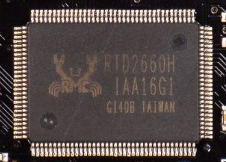
The Pimoroni driver board has been designed specifically to work with the 8 and 10 inch displays from their PiCade kits. Looking at the closeup photos, it looks like it’s based on a Realtek RTD2660H chip:
Googling “RTD2660H Datasheet”, I found this:
> **[RTD2660.jsp.pdf](https://aitendo3.sakura.ne.jp/aitendo_data/product_img/lcd_controller/Xs/RTD2660.jsp.pdf)**
>
> 5.25 MB
Which says it can output both TTL and LVDS, so it’s probably technically capable of supporting a good range of displays, but you’d be a bit on your own trying to do it with anything other than the Pimoroni displays.
Adafruit also sell a few driver boards based on the RTD2660H - They’ve got a huge guide here, with a list of all their driver and display combinations:
> **[The Adafruit HDMI Display Monitor ÜBERGUIDE](https://learn.adafruit.com/hdmi-uberguide/drivers)**
>
> We've added a bunch of HDMI/VGA/Composite displays into the store in the last few months - each with different specs and advantages. Here's a handy guide for choosing and using the best screen for your project that Adafruit has to offer!
If Adafruit still sells it, there’s a good chance we could get it in if it’s not already on our site 🙂
---
### Author:  [@greg183530](https://forum.core-electronics.com.au/u/greg183530)
#### Post date: [9 November 2021 22:14 UTC](https://forum.core-electronics.com.au/t/driver-boards-for-ips-screens/12063/3 "2021-11-09T22:14:25Z")
Thanks very much Oliver! super helpful information.
Trawled through the Ada fruit site and it seems that they only have driver boards for TFT in the 5" size (more options in 7" and up) [HDMI 4 Pi: 5 Display (no Touch) w/Mini Driver - 800x480 HDMI : ID 1928 : $59.95 : Adafruit Industries, Unique & fun DIY electronics and kits](https://www.adafruit.com/product/1928) even though it has that RTD2660H
Feel like I might be chasing a unicorn…
thanks again!!
---
### Author:  [@Oliver](https://forum.core-electronics.com.au/u/Oliver)
#### Post date: [9 November 2021 22:55 UTC](https://forum.core-electronics.com.au/t/driver-boards-for-ips-screens/12063/4 "2021-11-09T22:55:22Z")
Hi Greg,
Hmm, what _is_ the form factor you’re after?
Waveshare makes a 5 inch IPS display:
[https://www.waveshare.com/5inch-lcd-for-pi.htm](https://www.waveshare.com/5inch-lcd-for-pi.htm)
We don’t have it set up with a listing on our site, but we order from Waveshare regularly so we could probably get one in for you.
---
### Author:  [@greg183530](https://forum.core-electronics.com.au/u/greg183530)
#### Post date: [9 November 2021 23:19 UTC](https://forum.core-electronics.com.au/t/driver-boards-for-ips-screens/12063/5 "2021-11-09T23:19:24Z")
Hi Oliver,
I came across that waveshare unit but i think we need the cable from the screen (or control board) to be a HDMI & USB as it is routed through a tight assembly to the Rpi which is about 1metre from the screen. The ribbon cable would be difficult to make work in the assembly and had concerns about the durability and run length.
The Pimroni setup seems perfect except for the question around compatibly with a different screens.
Sorry- i understand that i’m being difficult with our very specific requirements 😬
---
### Author:  [@Oliver](https://forum.core-electronics.com.au/u/Oliver)
#### Post date: [10 November 2021 23:01 UTC](https://forum.core-electronics.com.au/t/driver-boards-for-ips-screens/12063/6 "2021-11-10T23:01:31Z")
Hey Greg,
No worries, makes life interesting! It’s worth making a post over on the Pimoroni Forums about using a different screen with their driver board - just to see what they have to say:
> **[Pimoroni Buccaneers](https://forums.pimoroni.com/)**
>
> Support and discussion forums for all things maker-related
Otherwise, it might be time to consider relaxing your requirement for IPS (TFT displays can be gorgeous - Pimoroni’s [Hyperpixel displays](https://core-electronics.com.au/touch-hyperpixel-4-0-hi-res-display-for-raspberry-pi.html) are spectacular tbh), or rolling your own DSI - HDMI adapter:
> **[A MIPI DSI Display Shield/HDMI Adapter](https://hackaday.com/2014/08/19/a-mipi-dsi-display-shieldhdmi-adapter/)**
>
> \[Tomasz\] tipped us about the well documented MIPI DSI Display Shield / HDMI Adapter he put on hackaday.io. The Display Serial Interface (DSI) is a high speed packet-based interface for delivering v…
Here’s an older topic about a similar situation:
> [@HDMI Driver board for 10.1 1200 x 1920 IPS Display for LattePanda](https://forum.core-electronics.com.au/t/hdmi-driver-board-for-10-1-1200-x-1920-ips-display-for-lattepanda/8468/2):
>
> Hi Axle, That 10.1in Latte Panda display uses a MIPI-DSI interface. We don’t have an adapter but there’s a great write up here on hackaday on putting one together: And here’s a datasheet for a chip from Analogue devices which you could implement in your own design: While the ADA2219 is an awesome product ([here’s the link to their guide](https://learn.adafruit.com/adafruit-tfp401-hdmi-slash-dvi-decoder-to-40-pin-ttl-display)) it does not provide the correct data feed to drive that display. As for the case, I reckon 3D printing something would definitely be your best way to g…
And some other info I’ve found:
[https://forums.raspberrypi.com/viewtopic.php?p=1023780#p1023780](https://forums.raspberrypi.com/viewtopic.php?p=1023780#p1023780)
I did find these two displays online made by Elecrow, but I don’t have any experience with them (and they aren’t one of our suppliers) so can’t vouch for their quality at all:
> **[RC050S HDMI 5 Inch 800x480 Capacitive Touch Monitor Built-in Speaker with...](https://www.elecrow.com/rc050s-hdmi-5-inch-800x480-capacitive-touch-monitor-built-in-speaker-with-backlight-control.html)**
>
> This 5-inch monitor with 800x480 high-resolution supports capacitive USB touchscreen, 5 points touch maximum. And it is especially designed for Raspberry Pi.
> **[5 inch 800 x 480 Capacitive Touch LCD Display for Raspberry Pi/ PC/ SONY PS4](https://www.elecrow.com/5-inch-hdmi-800-x-480-capacitive-touch-lcd-display-for-raspberry-pi-pc-sony-ps4.html)**
>
> The resolution of this 5 inch HDMI capacitive touch LCD display is 800 x 480 and doesn't require the driver. It is compatible with Raspberry Pi 3B+ and etc.