# Raspberry Pi UPS HAT (DFR0494)
**URL:** https://forum.core-electronics.com.au/t/raspberry-pi-ups-hat-dfr0494/5277
**Category:** DFRobot
**Created:** [6 May 2019 03:12 UTC](https://forum.core-electronics.com.au/t/raspberry-pi-ups-hat-dfr0494/5277 "2019-05-06T03:12:55Z")
**Posts on this page:** 20
**Page:** 1
### Author:  [@Core](https://forum.core-electronics.com.au/u/Core)
#### Post date: [6 May 2019 03:12 UTC](https://forum.core-electronics.com.au/t/raspberry-pi-ups-hat-dfr0494/5277/1 "2019-05-06T03:12:55Z")
This is a placeholder topic for [**“Raspberry Pi UPS HAT”**](http://core-electronics.com.au/catalog/product/view/sku/DFR0494) comments.
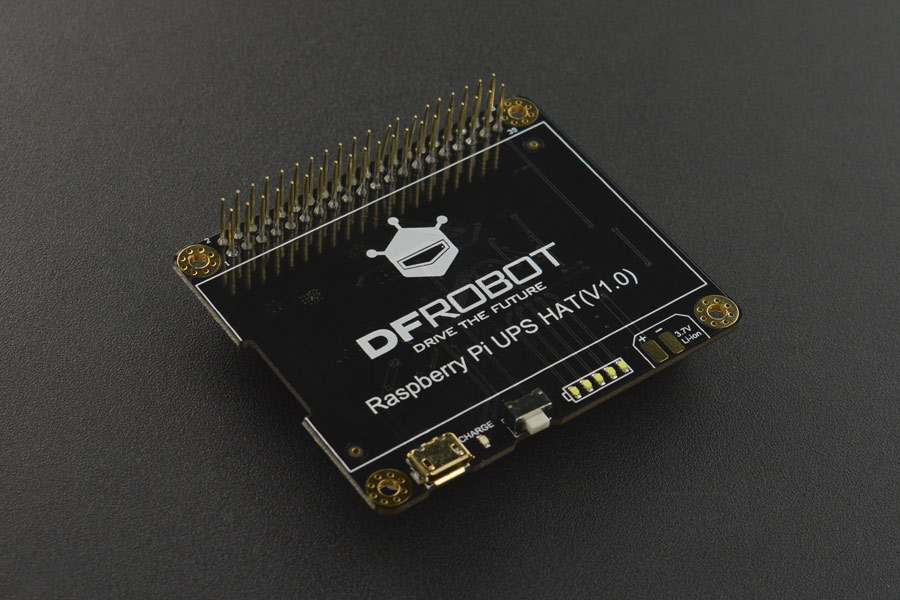
DFRobot Raspberry Pi UPS HAT is an uninterruptable power supply shield for Raspberry Pi. It can provide steady power source to Raspberry Pi for an extended period … read more
[**Read more**](http://core-electronics.com.au/catalog/product/view/sku/DFR0494)
---
### Author:  [@Ekin86194](https://forum.core-electronics.com.au/u/Ekin86194)
#### Post date: [6 May 2019 03:12 UTC](https://forum.core-electronics.com.au/t/raspberry-pi-ups-hat-dfr0494/5277/2 "2019-05-06T03:12:56Z")
Do you guys have a snippet of code for i2C connection of this? Do you also have documentation for this product?
---
### Author:  [@Ekin86194](https://forum.core-electronics.com.au/u/Ekin86194)
#### Post date: [7 May 2019 03:26 UTC](https://forum.core-electronics.com.au/t/raspberry-pi-ups-hat-dfr0494/5277/3 "2019-05-07T03:26:37Z")
Found it here: [https://wiki.dfrobot.com/Raspberry\_Pi\_%20UPS\_HAT\_SKU\_DFR0494](https://wiki.dfrobot.com/Raspberry_Pi_%20UPS_HAT_SKU_DFR0494)
You guys might want to add this.
---
### Author:  [@Stephen](https://forum.core-electronics.com.au/u/Stephen)
#### Post date: [8 May 2019 03:50 UTC](https://forum.core-electronics.com.au/t/raspberry-pi-ups-hat-dfr0494/5277/4 "2019-05-08T03:50:46Z")
Thanks Ekin!
---
### Author:  [@Anthony12822](https://forum.core-electronics.com.au/u/Anthony12822)
#### Post date: [10 May 2019 12:19 UTC](https://forum.core-electronics.com.au/t/raspberry-pi-ups-hat-dfr0494/5277/5 "2019-05-10T12:19:58Z")
My question is about the Li battery.
What is the maximum physical capacity of the battery in mAh and hence its physical dimensions.
Thank you
Anthony
---
### Author:  [@Stephen](https://forum.core-electronics.com.au/u/Stephen)
#### Post date: [13 May 2019 00:09 UTC](https://forum.core-electronics.com.au/t/raspberry-pi-ups-hat-dfr0494/5277/6 "2019-05-13T00:09:11Z")
Hi Anthony,
This product does not come with a battery. Any of our LiPo batteries will be compatible:
[https://core-electronics.com.au/power-batteries/liion-lipoly.html](https://core-electronics.com.au/power-batteries/liion-lipoly.html)
---
### Author:  [@Anthony12822](https://forum.core-electronics.com.au/u/Anthony12822)
#### Post date: [13 May 2019 09:12 UTC](https://forum.core-electronics.com.au/t/raspberry-pi-ups-hat-dfr0494/5277/7 "2019-05-13T09:12:57Z")
Dear Stephen,
Thank you for the reply. I know that the Li battery is not included. Having a look at [https://core-electronics.com.au/power-batteries/liion-lipoly.html](https://core-electronics.com.au/power-batteries/liion-lipoly.html) will the 6000mAh with SKU: CE04381 fit within the confines of the UPS HAT’s space and how does one secure the battery to the PCB?
I have **another question about the pinouts of the UPS HAT.** We know that the pins on the RPi include the power, ground, data pins, IIC pins and PWM pins. Does the UPS HAT’s pins only connect to the power pins of the RPi?
Thank you
Anthony
---
### Author:  [@Stephen](https://forum.core-electronics.com.au/u/Stephen)
#### Post date: [14 May 2019 02:44 UTC](https://forum.core-electronics.com.au/t/raspberry-pi-ups-hat-dfr0494/5277/8 "2019-05-14T02:44:33Z")
Hi Anthony,
There is no maximum capacity in mAh listed for this device. The largest battery that you could comfortably mount on the top of the UPS HAT would be the 4400mAh:
[https://core-electronics.com.au/polymer-lithium-ion-battery-4400mah.html](https://core-electronics.com.au/polymer-lithium-ion-battery-4400mah.html)
The 6000mAh will be the same footprint as the total board. You could attach it with some double sided tape.
As far as the pin used by the UPS hat, this will connect to the Power and Ground pins, as well as the I2C pins. None of these are ‘used’ though as they are busses, and still accessible via the headers on the top of the UPS HAT.
---
### Author:  [@safepay](https://forum.core-electronics.com.au/u/safepay)
#### Post date: [25 July 2019 22:33 UTC](https://forum.core-electronics.com.au/t/raspberry-pi-ups-hat-dfr0494/5277/9 "2019-07-25T22:33:17Z")
Hi.
I am looking at the DFRobot UPS Hat for a Home Assistant installation on a RPi 3B.
I understand that the hat sends a shutdown to the OS when the power is off and the battery is \< 10%.
What I want to know is if the hat sends a power on signal once power is restored and the battery is at a certain level.
The FAQ says: “The power supply will not be resumed unless the battery power is back up to above 10%.”. But this is ambiguous to me.
Does that mean that a power-on signal will be sent to the main RPi system at this point and therefore the RPI OS will be rebooted?
A number of UPS hats will shut down the RPi but not reboot the RPi once power is restored until a button is manually pressed. I want to avoid that scenario and have the system automatically restart.
Cheers.
---
### Author:  [@safepay](https://forum.core-electronics.com.au/u/safepay)
#### Post date: [29 July 2019 21:44 UTC](https://forum.core-electronics.com.au/t/raspberry-pi-ups-hat-dfr0494/5277/10 "2019-07-29T21:44:45Z")
My question was answered on the DFRobot product page forum.
The answer is that power cannot be restored automatically once tthe RPi is shut down.
---
### Author:  [@Paul5930](https://forum.core-electronics.com.au/u/Paul5930)
#### Post date: [22 August 2020 23:36 UTC](https://forum.core-electronics.com.au/t/raspberry-pi-ups-hat-dfr0494/5277/11 "2020-08-22T23:36:29Z")
A couple of things about this hat.
Firstly I was concerned about current draw on the pi 4. However the pi 4 itself only draws about half an amp - it probably spikes on startup etc like most things. I wanted to run the 7" true pi screen - it does another half amp so allowing for spikes this ups does the trick.
However the version that I got has the two pin battery socket in a different place on the board. The pictures show it about the middle of one edge. It is now towards one side, next to the gpio connector, and it hits to top of the pi 4 POE riser. You might have better luck with the pi zero version of this board.
One thing I was disappointed with though was that you have to use the usb socket to charge and power the board. It won;t take power from the pi itself. This means on the little computer I built, I now have three power inlets - this board, the pi and the screen. Of course the case I got doesn’t have a hole for the ups board. Mind you the connectors into gpio for the screen mean that the case can’t have the back on it anyway and then there is the battery that is too big to fit.
---
### Author:  [@Bryce](https://forum.core-electronics.com.au/u/Bryce)
#### Post date: [25 August 2020 02:24 UTC](https://forum.core-electronics.com.au/t/raspberry-pi-ups-hat-dfr0494/5277/12 "2020-08-25T02:24:52Z")
Hey Paul,
Excellent note, if you’re looking for a way to get around this, you can likely take the 2nd and 6th pins of the Pi and attach them to the appropriate 5 V rail on the HAT, but I totally understand that’s an inconvenience for the project. Otherwise, if you can please send through an email to support@coreelectronics.com.au we should be able to organise for our site to be updated to reflect all the changes that you’ve noted. If there’s anything else that we can do for you please let us know!
Bryce
Core Electronics | Support
---
### Author:  [@Steve88646](https://forum.core-electronics.com.au/u/Steve88646)
#### Post date: [14 October 2020 07:45 UTC](https://forum.core-electronics.com.au/t/raspberry-pi-ups-hat-dfr0494/5277/13 "2020-10-14T07:45:28Z")
Hi.I purchased this UPS HAT for my Pi 4 and seem to have run into issues. I have followed the install guide as outlined on the [DFRobot wiki page](https://wiki.dfrobot.com/Raspberry_Pi_UPS_HAT_SKU_DFR0494) however when testing the installation using `sudo i2cdetect -y l`, the output is blank

The raspi-blacklist.conf file is also blank.
Although I am having the above issue, the battery and UPS are working fine. I am able to unplug the device from mains power and the battery takes over.
The intention of this UPS was to safely shut the Pi down once it lost mains power.
Any help would be much appreciated.
---
### Author:  [@Bryce](https://forum.core-electronics.com.au/u/Bryce)
#### Post date: [15 October 2020 23:09 UTC](https://forum.core-electronics.com.au/t/raspberry-pi-ups-hat-dfr0494/5277/14 "2020-10-15T23:09:43Z")
Hey Steve,
Welcome to our forum!
That’s very interesting, do you have another Pi that you can confirm this against. It appears that i2c-tools was installed correctly. However, the UPS isn’t appearing at 0x10 as it should. Can you try running their script to check that the issue is with i2cdetect rather than with the connection to the board itself, I’m expecting this script to fail and return an error, but the results may be able to get us a better idea of what’s going on. (also, is your board a v1.0 should be written on the front, I’ve tested the v1.0 with a Pi 4 here and found that the connection at address 0x10 was successful on a fresh install so if you’re not using a clean install of Raspbian that may be causing the issues too)
```auto
import smbus
addr=0x10 #ups i2c address
bus=smbus.SMBus(1) #i2c-1
vcellH=bus.read_byte_data(addr,0x03)
vcellL=bus.read_byte_data(addr,0x04)
socH=bus.read_byte_data(addr,0x05)
socL=bus.read_byte_data(addr,0x06)
capacity=(((vcellH&0x0F)<<8)+vcellL)*1.25 #capacity
electricity=((socH<<8)+socL)*0.003906 #current electric quantity percentage
print("capacity=%dmV"%capacity)
print("electricity percentage=%.2f"%electricity)
```
Bryce
Core Electronics | Support
---
### Author:  [@Steve88646](https://forum.core-electronics.com.au/u/Steve88646)
#### Post date: [16 October 2020 01:02 UTC](https://forum.core-electronics.com.au/t/raspberry-pi-ups-hat-dfr0494/5277/15 "2020-10-16T01:02:16Z")
Hi Bryce.
Thanks for the reply. It seems there is an issue with the Pi I was using. I switched over to another Pi 4 as suggested and it is working as expected. Thanks for the tip!

Now that that’s working, is there a way to trigger the shutdown once AC power is dropped?
Steve
---
### Author:  [@Bryce](https://forum.core-electronics.com.au/u/Bryce)
#### Post date: [16 October 2020 01:18 UTC](https://forum.core-electronics.com.au/t/raspberry-pi-ups-hat-dfr0494/5277/16 "2020-10-16T01:18:01Z")
Hey Steve,
Absolutely, you’ll have to write a custom script, but if you monitor the variable _electricity_ from the above script using a daemon that runs constantly in the background, then trigger `sudo shutdown -h now` once it drops below a certain threshold you can use the UPS as a safe shutdown during blackouts, and during outages that don’t last long the shutdown won’t trigger. It’ll require some experimentation and you’ll need to do some research on whether libraries already exist to do similar functions and how they can be modified, but yes, it should be possible. Make sure to let us know about your project once you’ve got it working, that’d be extremely helpful for other users of this board
Bryce
Core Electronics | Support
---
### Author:  [@Oliver](https://forum.core-electronics.com.au/u/Oliver)
#### Post date: [22 October 2020 02:46 UTC](https://forum.core-electronics.com.au/t/raspberry-pi-ups-hat-dfr0494/5277/17 "2020-10-22T02:46:20Z")
Hi Everyone,
> **[Fixing A Cheap UPS HAT For Your Raspberry Pi With A Tiny Daemon](https://hackaday.com/2019/08/27/fixing-a-cheap-ups-hat-for-your-raspberry-pi-with-a-tiny-daemon/)**
>
> An uninterruptible power supply (UPS) isn’t something solely to have hooked up to your desktop PC. Your Raspberry Pi SBC might also benefit from it. Yet the available options aren’t too…
Came across this link. Leaving it here in case it’s handy for someone in future 🙂
Regards,
Oliver
Support | Core Electronics
---
### Author:  [@snh](https://forum.core-electronics.com.au/u/snh)
#### Post date: [2 January 2021 01:10 UTC](https://forum.core-electronics.com.au/t/raspberry-pi-ups-hat-dfr0494/5277/18 "2021-01-02T01:10:42Z")
Does anyone know if Core are still shipping the V1 revision of this board, or are they now shipping the newer V2 revision detailed at [https://wiki.dfrobot.com/Raspberry\_Pi\_UPS\_HAT\_SKU\_DFR0494](https://wiki.dfrobot.com/Raspberry_Pi_UPS_HAT_SKU_DFR0494)?
---
### Author:  [@Owen](https://forum.core-electronics.com.au/u/Owen)
#### Post date: [4 January 2021 01:59 UTC](https://forum.core-electronics.com.au/t/raspberry-pi-ups-hat-dfr0494/5277/19 "2021-01-04T01:59:38Z")
Hey,
I can confirm we are now stocking the V2.0 version of this HAT. Let us know if we can help with anything else!
---
### Author:  [@RB0135](https://forum.core-electronics.com.au/u/RB0135)
#### Post date: [4 May 2021 00:34 UTC](https://forum.core-electronics.com.au/t/raspberry-pi-ups-hat-dfr0494/5277/20 "2021-05-04T00:34:21Z")
Hi all…
Can this be used in conjunction with other hats? I have a HiFiBerry Digi Hat. The main use of this “ups” hat for me will only be to shutdown the Pi once Power is turned off.
Thanks.
[Next page](https://forum.core-electronics.com.au/t/raspberry-pi-ups-hat-dfr0494/5277.md?page=2)