
Hi, thanks, unfortunately it didnt work. Seems it had the latest version of setuptools already
Reinstalling OS worked tho
2 Likes
Hi Zuzia,
Great to hear that you managed to get it working!
hello, i have followed the video step by step but when i try to run the model training code i get this error:
Traceback (most recent call last):
File “/home/tak/Desktop/Face Recognition/model_training.py”, line 2, in
from imutils import paths
ModuleNotFoundError: No module named ‘imutils’
ive tried reinstalling imutils over and over
Update: So I tried reinstalling the OS and now I get the same error for cv2 when trying to run the image_capture.py, I have installed both it makes no sense?
Hey Raspi, welcome to the forums!
If you have installed it, I would double-check your usage of virtual environments. Ensure that you are installing the library into the virtual environment, and that when you run the code in Thonny, it is using the virtual environment you installed the library into.
This is better covered in the written guide so give it a go and let us know if the issue still occurs!
LOL! Didn’t realize it was opening geany automatically. Stupid moment, thank you for the help.
2 Likes
Hi. This is a great project and I am trying to implement this system onto my entrance. However the system seems to lack a bit accuracy for me - 2 out of 3 of my friends got recognized as me. I had 20 photos in database and with different angle. Would continuing to add photos help? Any other advices and ideas why so?
1 Like
Hey Kelvin, welcome to the forums!
The package we use for this is not very advanced and it sounds like you may be an unlucky case of this not working effectively. Have you tried the opposite route and used only 1 or 2 good photos? Ensure the photos are dead on, have decent lighting and aren’t blurry in any sense.
Let us know how it goes!
1 Like
Hi. Thank you for the help. I tried to turn down the “tolerance” parameter, and it seems to fix the problem. 
1 Like
Hi Jaryd. I have a question just out of curiosity. Are the algorithms or any other aspects in this project related to AI in the calculating? Or is it completely non-AI. It would be cool it if did.
Hey @Kelvin293406,
I’m a little uncertain what you are asking here. Any sort of computer vision, whether it’s face recognition or counting how many traffic cones are on a road could be defined as “AI” (it’s a bit of a loose term nowadays). However, this isn’t the same “AI” as that of LLMs like ChatGPT. This is essentially just a lot of equations and probabilities being crunched to analyse if the pixels in the camera are a face and match the pixels and probabilities it has been trained to identify.
If you are asking if it was developed with AI, I would confidently say it is not. It was released in 2017 which is a good 5 years before things like ChatGPT were viable.
If you have any additional questions let us know!
3 Likes
Gotcha. Thanks.
2 Likes
For face detection, I use haarcascade library. This one looks different. Gotta try.
2 Likes
Hi, this is Caroline Dunn, the person credited at the bottom of your post “for developing much of the code that utilises the pickle model.”
Thanks for updating the code for the virtual environment and picamera2.
I was wondering if you were going to further update this tutorial to use with the AI Hat+ and/or AI Camera?
1 Like
Hi @Caroline295560, first of all, thank you for your work on the project!
In terms of getting it going on the AI HAT or AI Camera, both of those have their own very unique workflows that might be difficult to get going with the original library. Working within their nice ecosystem is pretty straightforward, but trying to use something from outside of it can be a bit of a challenge (I’m also a mechatronics eng, not a software eng  ).
).
It was definitely one of our thoughts to try but we found that we got adequate performance just on the Pi 5’s silicon, good enough for most projects while still being one of the easiest ways to get face recognition going.
Hopefully someone else with a bit more of a wrinkly brain figures out how to do it, really great piece of hardware.
Cheers!
Thanks for getting back to me @Jaryd !
I was thinking the same thing, but hoping there was a more obvious way to train the model for the AI Hat / AI Camera. Thanks, Caroline
2 Likes
Hello Jaryd and all,
I really enjoyed your guide on facial recognition, and it’s the only one that satisfied me (after many other attempts).
I recognize my face very well, BUT I’d like to add a few more, maybe two or three, no more (my wife is jealous otherwise).
I work with an 8GB RPI 5 and BOOKWORM, so that’s enough.
I created a directory in DATASET + the photos!
BUT what next ? (I’m a Python novice)
How do I do this with model_training.py and encodings.pickle?
What additional information and where do I add the nows names?
Thanks
Hi @Henri296003
Welcome to the forum!
You should be able to follow the same steps from the guide once you’ve trained the new model, from there it should be the same as it originally was, but you would be able to detect the new person you’ve trained it to.
I do it.
One face is fine, it works very well.
But two faces, maybe three?
Thanks for reply.
1 Like
Hey @Henri296003,
If you are trying to train the model to detect other people, this can be done through the image capture code. At the top, you will find a line that lets you change the name of the person your are identifying.
PERSON_NAME = "jaryd"
Set this to your name, take some photos, then change the name to someone else’s and take their photos. Every time you do this it will create a file in the data set folder with the name of the person and the photos of them. For example, I took some photos with the name jaryd, and it created this folder:
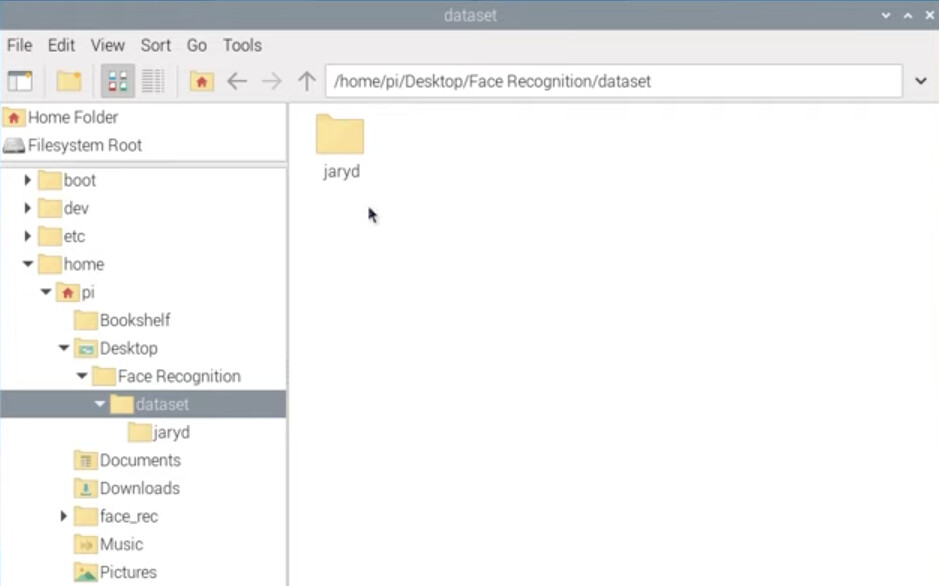
Then when you run the training code it will take all the folders with a name and learn to recognise their faces.
Hope this helps!
2 Likes



