Double-check first that you’re using the earlier Raspberry Pi ‘Buster’ OS version. If true it looks like the error message is in reference to | No module named ‘cv2’ |. I’ll focus on making sure you have Open-CV installed in a location that Python can access it. Type and enter the following into your terminal.
hi timmy i have stack here and i dont know why this is my problem
‘>>>%Run headshots_picam.py
Traceback (most recent call last):
File “/home/pi/facial_recognition/headshots_picam.py”, line 17, in
cv2.imshow(“Press Space to take a photo”, image)
cv2.error: OpenCV(4.7.0) /tmp/pip-wheel-5janp3rk/opencv-python-headless_13883d328619459880e68d3ddf60846c/opencv/modules/highgui/src/window.cpp:1272: error: (-2:Unspecified error) The function is not implemented. Rebuild the library with Windows, GTK+ 2.x or Cocoa support. If you are on Ubuntu or Debian, install libgtk2.0-dev and pkg-config, then re-run cmake or configure script in function ‘cvShowImage’’
My Raspberry Pi Camera is mounted on a tabletop tripod. Unfortunately, the image is upside down. I was able to rotate it in headshots_picam.py by adding a line “cam.rotation=180”, but that doesn’t work in facial_req.py. What is the best way to rotate the image when running facial_req.py ?
In fact, I’d like to permanently rotate the image upright for images and video. v4l2-ctl doesn’t seem to have any effect.
SOLUTION
Ok, so here’s what worked:
Use the cv2.flip() function
In the while loop, add
frame = cv2.flip(frame, flipCode = -1)
Anyway, thanks for a tutorial that worked (for the most part). I just ran it on a fresh Raspberry Pi 4B and a fresh Buster. There were some minor tweaks necessary to get this to work, but overall it went pretty smoothly. All the other tutorials I’ve tried failed miserably at some point.
Hello, I find the project very interesting and I try to do it, but no matter what I do, I encounter a problem with libcamera.
The first time I tried to follow from the beginning step by step and I got this error :
Command “/usr/bin/python -u -c “import setuptools, tokenize;file =’/tmp/pip-install-R4iV6I/dlib/setup.py’;f=getat tr(tokenize, ‘open’, open)(file );code=f.read().replace(’\r\n’, ‘\n’);f.close();exec(compile(code, file , ‘exe c’))” install --record /tmp/pip-record-m0u3rJ/install-record.txt --single-version-externally-managed --compile” failed with error code 1 in /tmp/pip-install-R4iV6I/dlib/
After I reset the micro sd and tried to do libcamera-hello and I get bash: libcamera-hello: command not found.
raspistill -t 0 works fine. libcamera-hello dose not.
No matter what I’ve tried I can’t solve this. Can you please help me?
Seems i get the same error even when i am in the opencv/build directory. what did you do to fix this?
"make Warning:
No source or binary directory provided. Both will be assumed to be the
same as the current working directory, but note that this warning will
become a fatal error in future CMake releases.
CMake Error: The source directory “/home/cat/opencv/build” does not appear to contain CMakeLists.txt.
Specify --help for usage, or press the help button on the CMake GUI.
bash: -D: command not found
bash: -D: command not found
bash: -D: command not found
bash: -D: command not found
bash: -D: command not found
bash: -D: command not found
bash: -D: command not found
bash: -D: command not found
bash: -D: command not found
make: *** No targets specified and no makefile found. Stop."
And make sure that the CMakeLists.txt file certainly exists where you’re expecting it, and that the user has at minimum Read but preferably full Read-Write-Execute permissions on that file? I’m wondering whether it was originally downloaded with the superuser or another user set as the owner and you haven’t got the appropriate permissions when running make to read the file.
Hi @Tim . I’ve already done this with Raspberry Pi OS, and it worked great. However, now I’m using ubuntu (to be able to use ROS) and I’m having lots of trouble with the cmake part. After I insert the last command (-D BUILD_EXAMPLES=OFF …), a red error text pops up:
Required baseline optimization is not supported: VFPV3
  (CPU_BASELINE_REQUIRE=;VFPV3;NEON)
Call Stack (most recent call first):
  cmake/OpenCVCompilerOptions.cmake:329 (include)
  CMakeLists.txt:653 (include)
I’ve tried updating the software, removing the command, specifying the flags… but nothing. It always gives me the same error. What can I do?
Hey Tim, When running “pip install face-recognition --no-cache-dir” I get this error
Can you help? Thanks!
Using cached https://files.pythonhosted.org/packages/3b/45/5e3320d2d0b399908a97824581bb52fbbc0d71b21c4f184932d58c6bf18a/cmake-3.27.7.tar.gz
Exception:
Traceback (most recent call last):
File “/usr/lib/python2.7/dist-packages/pip/_internal/cli/base_command.py”, line 143, in main
status = self.run(options, args)
File “/usr/lib/python2.7/dist-packages/pip/_internal/commands/install.py”, line 338, in run
resolver.resolve(requirement_set)
File “/usr/lib/python2.7/dist-packages/pip/_internal/resolve.py”, line 102, in resolve
self._resolve_one(requirement_set, req)
File “/usr/lib/python2.7/dist-packages/pip/_internal/resolve.py”, line 256, in _resolve_one
abstract_dist = self._get_abstract_dist_for(req_to_install)
File “/usr/lib/python2.7/dist-packages/pip/_internal/resolve.py”, line 209, in _get_abstract_dist_for
self.require_hashes
File “/usr/lib/python2.7/dist-packages/pip/_internal/operations/prepare.py”, line 298, in prepare_linked_requirement
abstract_dist.prep_for_dist(finder, self.build_isolation)
File “/usr/lib/python2.7/dist-packages/pip/_internal/operations/prepare.py”, line 100, in prep_for_dist
self.req.load_pyproject_toml()
File “/usr/lib/python2.7/dist-packages/pip/_internal/req/req_install.py”, line 428, in load_pyproject_toml
str(self)
File “/usr/lib/python2.7/dist-packages/pip/_internal/pyproject.py”, line 43, in load_pyproject_toml
pp_toml = pytoml.load(f)
File “/usr/share/python-wheels/pytoml-0.1.2-py2.py3-none-any.whl/pytoml/parser.py”, line 303, in load
filename=fin.name)
File “/usr/share/python-wheels/pytoml-0.1.2-py2.py3-none-any.whl/pytoml/parser.py”, line 370, in loads
toks.expect(‘=’, ‘expected_equals’)
File “/usr/share/python-wheels/pytoml-0.1.2-py2.py3-none-any.whl/pytoml/parser.py”, line 250, in expect
self.error(error_text)
File “/usr/share/python-wheels/pytoml-0.1.2-py2.py3-none-any.whl/pytoml/parser.py”, line 253, in error
raise TomlError(message, self.pos[0][0], self.pos[0][1], self._filename)
TomlError: /tmp/pip-install-gDsE2R/cmake/pyproject.toml(87, 24): expected_equals
Hi my name is james i’ve been trying to run facial recognition on my raspi 4 I run the code took all my photo in the folder James . i cd into facial recognition run the code python train_model.py
i have opencv installed i still comes up with no directory opencv ?
I followed all instuction to load the code . I tried python Import opencv2 error message come up
Also trying this line of code sudo apt install libgtk-3-dev libqtgui4 libqtwebkit4 libqt4-test python3-pyqt5
in the command wouldn’t run it would say something like "Package ‘libqtgui4’ has no installation candidate & Unable to locate package libqtwebkit4 & Unable to locate package libqt4-test
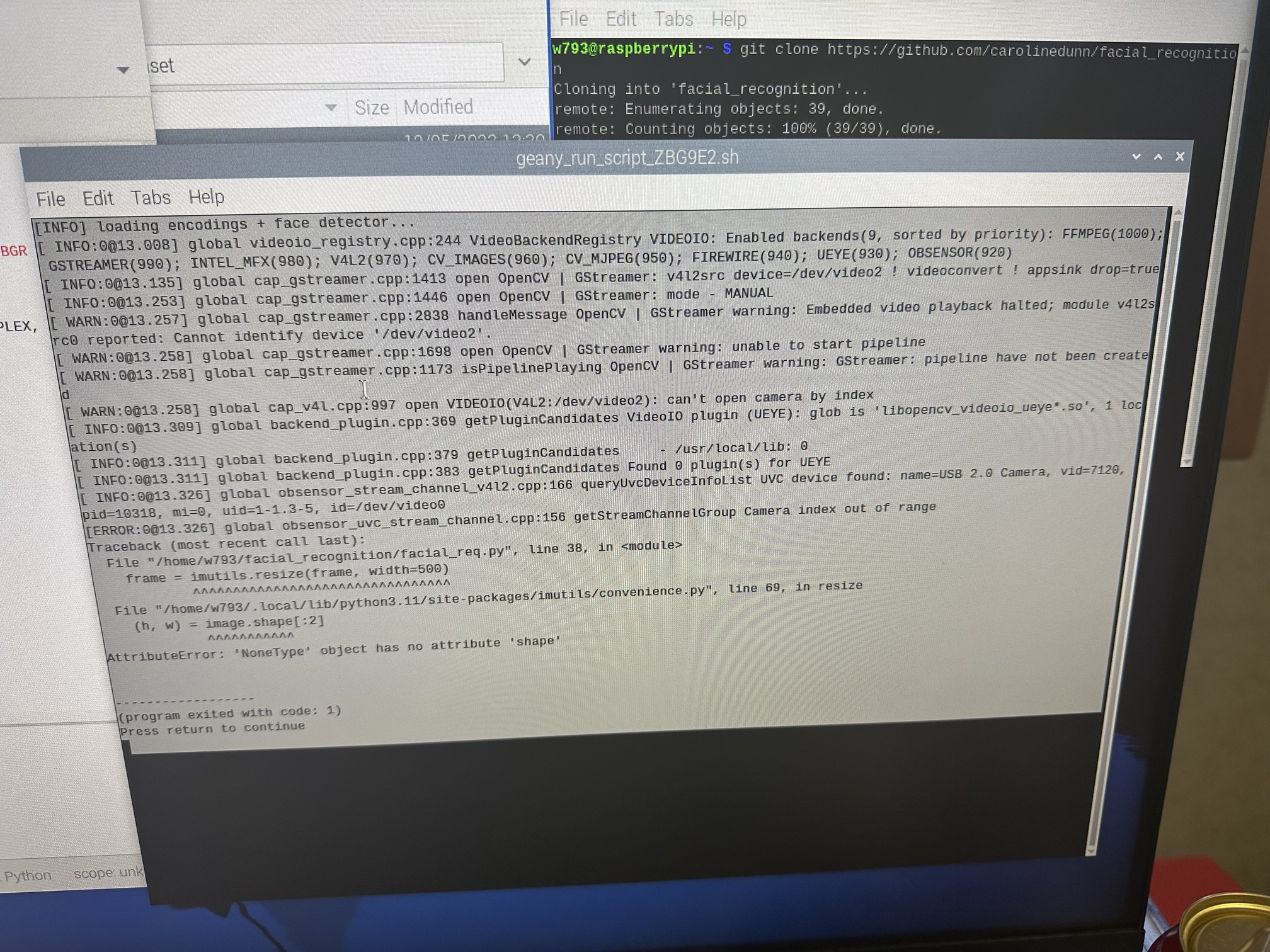
Hopefully the jpeg I included loads on this site, and have a great week!
Is this guide outdated? I tried it with the new “Bookworm” Debian 12 version with the Pi Cam 3 and it has some errors the headshots_picam.py doesn’t work now If it doesn’t work anymore then please send me a updated guide so I can actually finish my science fair project (attendance project)


 |
|  Will238927: