
Detect and Track Humans with mmWave Radar on an Arduino

Hello everyone! with the administrator’s permission I am sharing the RD03D.zip library modified with chatgpt and functional for the ESP32 that uses UART2 instead of the Software.h serial not supported by the esp32. And here’s an example of how it works:

#include <RadarSensor.h>

#define RADAR_RX 16
#define RADAR_TX 17

RadarSensor radar(RADAR_RX, RADAR_TX, Serial2);

//#include <RadarSensor.h>
//RadarSensor radar(2,3); // RX, TX sensor pins

void setup() {
Serial.begin(115200);
radar.begin(256000);
}

void loop() {
if(radar.update()) {
RadarTarget tgt = radar.getTarget();
// Send data in CSV form: angle, distance, speed
Serial.print(tgt.angle); Serial.print(“,”);
Serial.print(tgt.distance); Serial.print(“,”);
Serial.println(tgt.speed); // endline to finish each data block
}
delay(100); // optional delay for stable communication
}

And here’s a screenshot of Processing in action

The library

RadarSensor_ESP32_Compat.zip (3.3 KB)

I hope you find it useful, best regards!
1 Like

Hey @Electrik77,

Thanks for sharing that man! I’m sure we will be pointing people with questions about an ESP32 version of this to your code, cheers for the community contribution!

Hello everyone, I am having the same problem as @Luke202527. I am using an ELEGOO UNO R3 board, and after following the steps in the video, the Serial Monitor only shows “Radar Sensor Started” but no data is displayed.

I tried the solution suggested by @Jaryd: I replaced the library, updated the code, and connected the radar to pins 0 (RX) and 1 (TX) using hardware serial. However, I am still not receiving any readings.

I have checked the wiring and it seems correct. I am also using the recommended baud rate (256000).

Has anyone managed to get this working with an ELEGOO UNO R3? Could this be a compatibility issue like the one described with some R3 boards?

Any help would be greatly appreciated. Thanks!

Hi Javier

The 256000 is not the baud rate. It is the Radar operating frequency. Could be 25.6GHz.

This sets the Baud rate to 115200.
Cheers Bob

Hey there, Bob, in this case 256000 is the baud rate with communicating between the Arduino, so it is in fact the baud rate.

@Javier317816 I think this does look like the same issue @Jaryd found earlier in the thread. Because of how fast the baud rate is, the older R3’s, including the clones, are not able to process it.

While a new Arduino can be a bit of an investment, we have a tutorial on how to get this code working with the Raspberry Pi Pico.,

Hi Jane
Sorry I am somewhat behind with all this baud rate stuff. I thought “baud rates” sort of maxed out at 115000 and I didn’t expect 2 baud rates in almost the same statement.
Cheers Bob

Hi @Jane,

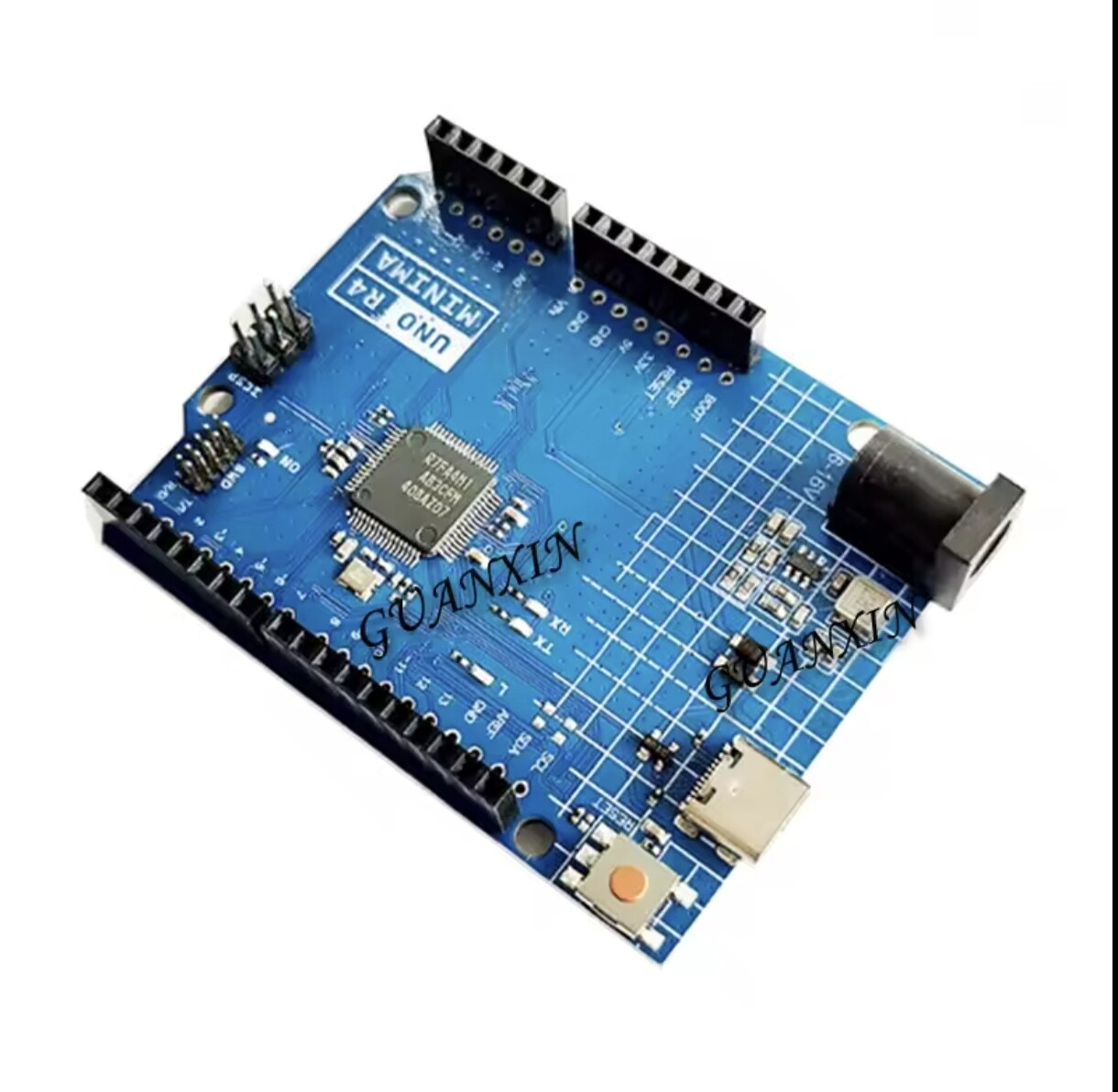
So just to confirm with my Arduino ELEGOO uno R3, does that mean it’s basically not going to work reliably with the RD-03D sensor?

Would switching to something like in the photo solve the issue, or is there any workaround to make it work on the R3?

Thanks!

@Robert93820, Nope, they can go a fair bit higher:

But as Jaryd mentioned earlier in this thread, 256000 is an unusually fast data stream for a microcontroller. Based on everything that has come before, the R3-style boards/clones seem particularly susceptible to sync issues with it and it doesn’t look like they can be used with this guide.

The Uno R4 clones you have linked to should be fine, as long as they match the better specs of the official boards.

Hello Jaryd and Friends,

The GOOD:

I am using Arduino Mega for this project. I have the 3 minimum connections: GND, 5V, Tx(RD03D)->Rx(MEGA Pin 19). I am successfully getting meaningful serial communication. I used the “RD03D_Hardware_Serial.zip” library and updated the RadarSensor.cpp file to use Serial2 for Arduino pin 19.

I am successfully plotting on Processing IDE.

The BAD:

I am getting "nan"s in my distance measurement sometimes. I’ll get good x and y values back to back, and one distance measurement will be a value, and the next will be a “nan”.

Additionally, I can’t seem to get a distance value of more than maybe 200 mm.

Sample 1

Raw Data: AA,FF,3,0,F7,85,33,84,0,0,68,1,0,0,0,0,0,0,0,0,0,0,0,0,0,0,0,0,55,CC,
X (mm): 5F7 (1527d)
Y (mm): 433 (1075d)
Distance (mm): 118.09
Angle (degrees): 54.85
Speed (cm/s): 0.00

Sample 2

Raw Data: AA,FF,3,0,F7,85,3F,84,0,0,68,1,0,0,0,0,0,0,0,0,0,0,0,0,0,0,0,0,55,CC,
X (mm): 5F7 (1527d)
Y (mm): 43F (1087d)
Distance (mm): nan
Angle (degrees): 54.55
Speed (cm/s): 0.00

Please Help.

EDIT: The distance measurements don’t make sense at all actually, and I’ve looked at the formula in RadarSensor.cpp and its pretty straight forward.

distance = sqr(x^2 + y^2)…

if x = 1527 and y = 1075, distance = 1867, nowhere close to 118.

I get floating points can be inaccurate, but that’s just wrong, lol.

SOLUTION:

In RadarSensor.cpp replace the following commented line with the line below.

// target.distance = sqrt((target.x * target.x) + (target.y * target.y));
target.distance = hypot(target.x,target.y);

At a guess the distance math kinda looks like a size int issue.
i.e. if you assume its using 16 bit int, the math gives the 118 value which would be wrong (note I am assuming the X and Y are the two lengths of a right angle triangle and the distance is the 3rd side).


X (mm): 5F7 (1527d)
Y (mm): 433 (1075d)
Distance (mm): 118.09

1527 ^ 2 = 0x0023 9451
1075 ^ 2 = 0x0011 A229

Assuming its a 16 bit int (not 32 that would be needed)
  0x9451 + 0xA229 = 0x1 367A
  0x367A => 13946 
  SQRT (13946) = 118.093

But if we assum a larger int.. e.g a 32 bit int.

1527 ^ 2 = 0x00239451
1075 ^ 2 = 0x0011A229
0x00239451 + 0x0011A229 = 0x0035367A 
sqrt (0x0035367A) or in dec. 
sqrt (3487354) = 1867.44

Arduino Mega Serial Pin correction to post:
Serial2 Rx → Pin 17
Serial1 Rx → Pin 19

1 Like



