DS18B20 temperature probe question

My project is a seawater temperature logger transmitter

The DS18B20 sensor is mounted on an offshore navigation pole. The data is acquired by a Pico2 and transmitted hourly by a SX1262 LoRa/Pico Meshtastic. The set up is solar powered

The receiver is about a Km away and logs to file and uploads to www.Adafruit io hourly

My problem is the temperature values occasionally are exactly the same for 2 or 3 hourly readings eg 21.88, 21.88, 21.88

This doesnt seem correct as the temperature at the site is not stable to 2 decimals places. Does the sensor need a significant change to update the value? Perhaps the buffer is not refreshing every time

1 Like

Hey there, @Robert281517,

Could be a couple of things there, but my money is on something in the Pico’s code playing up.

Would you be able to reply and attach the code you’re using on the Pico to this post? It will give us a better idea of what could be going wrong.


import machine
from machine import UART, Pin, I2C, SoftI2C,
import onewire
import ds18x20
import time
import urtc

sda_pin=Pin(4)
scl_pin=Pin(5)

i2c_rtc = SoftI2C(scl=Pin(5), sda=Pin(4))
time.sleep(0.5)

rtc = urtc.DS3231(i2c_rtc)

ds_pin = machine.Pin(22) # The Raspberry Pi Pico pin GP22 connected to the DS18B20 sensor

# Initialize UART 1, TX pin is GP8 and RX pin is GP9

uart = UART(1, baudrate=115200, tx=Pin(8), rx=Pin(9))

file = open(“Temperature_log.txt”,“a”)
#led = Pin (“LED”, Pin.OUT) #not active to save power

# Create the onewire object

OneWire = onewire.OneWire(ds_pin)

# Create the DS18X20 object

DS18B20 = ds18x20.DS18X20(OneWire)

# Scan for devices on the bus

sensor_addresses = OneWire.scan()
print('Found DS18B20 devices: ', sensor_addresses)

#timeout_ms =(5000)
#wdt = WDT(timeout=5000)

# Main loop to read and print the temperature every second

while True:

    DS18B20.convert_temp()
    time.sleep_ms(750)
    for address in sensor_addresses:
        temperature = DS18B20.read_temp(address)
    
        current_datetime = rtc.datetime()
        formatted_date = '{:02d}-{:02d}-{:04d}'.format(current_datetime.day, current_datetime.month, current_datetime.year)
        formatted_time = '{:02d}:{:02d}:{:02d}'.format(current_datetime.hour, current_datetime.minute, current_datetime.second)
        print (formatted_date)
        print (formatted_time)
        print('Temperature: {:.2f} °C'.format(temperature))


    file.write("Flinders Temp:,"+( "{:.2f}".format(temperature)+", " + (formatted_date) +", " + (formatted_time)+"\n"))
    
    uart.write("Flinders Temp:,"+( "{:.2f}".format(temperature)))#+", " + (formatted_date) +", " + (formatted_time)+"\n"))
    time.sleep(1)
    uart.write("Seawater Temp:,"+( "{:.2f}".format(temperature)+", " + (formatted_date) +", " + (formatted_time)+"\n"))    
    
    file.flush()
    time.sleep(3600)
1 Like

Thanks

My copy and paste has lost indents butI hope you get the idea

I have onewire and ds18x20 installed

there are two uart.write strings. Flinders temp is not time stamped to simplify integration to Adafruit IO feed

1 Like

Im trying to work out the exact data flow.
Does it read just once per hour then write to the file AND send to the remote device over lora ?

On the remote device are you logging the “sensor read” data/time ? i.e. is it getting new data, or an old packet ?

Maybe an example of the log where you say it has the same temperature might help clear it up a little.

Assuming the module code is ok! A few places that may not work.

  1. What value do you get if the sensor did not respond ?
  2. Is the setup where it reads the sensor logging the correct values ?
  3. Is there any data at the remote site that could indicate an issue (e.g. missing data/lora data loss)
1 Like

Thanks

Yes reads every 3600 seconds and uart.write to lora

Not sure if its always getting a new packet

Today at 5:33 and 6:33 the readings were both 20.69 , also 1:33 and 2:33 , 20.94 Its highly unlikely the identical reading is correct with a 2 degree diurnal range of temperature

1 The sensor always responds with a value. During bench testing a I did get the default dud value of 85 but that was a poor breadborad connection on the 4.7K PU resitier

2 The sensor reads realistic values and follows expected trends

3 I have a Hobo logger deployed at the site that is recovered monthly. Previous data has good correlation to the DS18B20 (a small offset within sensor specifications

1 Like

I would be interested in what you onsite logs show compared to what this sensor setup is reporting.
I assume its still running at the default 12 bit resolution ?
If, for example it some how was running at 9 bit, the it will be with 0.5 Deg C so you would need enough change to see a difference.

Bits Resolution
 9	0.5°C
10	0.25°C
11	0.125°C
12 	0.0625°C

The default resolution at power-up is 12-bit.
1 Like

That couldbe it

I presume the bit rate is managed by onewire or ds,18x routines?

1 Like

The data updates with a delta of 0.25

That would be 12bit

Maybe the identical readings are less than delta 0.25

1 Like

Grab a copy of the data sheet
This is the one for the chip that I found
https://www.analog.com/media/en/technical-documentation/data-sheets/DS18B20.pdf?ADICID=SYND_WW_P682800_PF-spglobal

Im guessing you would need to adjust the configuration register as needed.
Note: I have not looked into how to do that, but your API/Library may already have something ?

1 Like

If I’m reading the datasheet Michael provided correctly, 12-Bit actually corresponds to an amount of 0.0625.

“The resolution of the temperature sensor is user-configurable to 9, 10, 11, or 12 bits,
corresponding to increments of 0.5°C, 0.25°C, 0.125°C, and 0.0625°C, respectively. The default resolution at power-up is 12-bit” - p.5.

That definitely would correlate to your data, with 0.06 degrees celcius between 20.69, 20.75, and 20.81. The sensor would just be incapable of recording any fluctuation more precise than that.

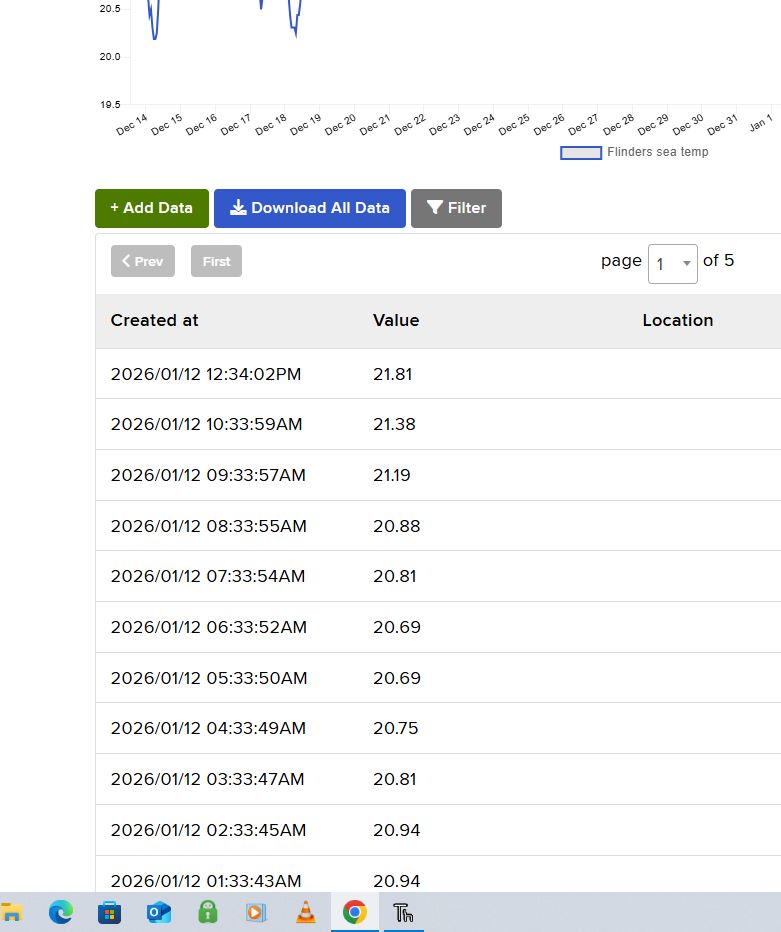
Yes the default bitrate gives resolution of 0.06degc

Thanks Michael and Jane for your insight

You have confirmed a defined change in temperature is required to refresh the value

The sensor is working as it is designed

Happy days!

1 Like



