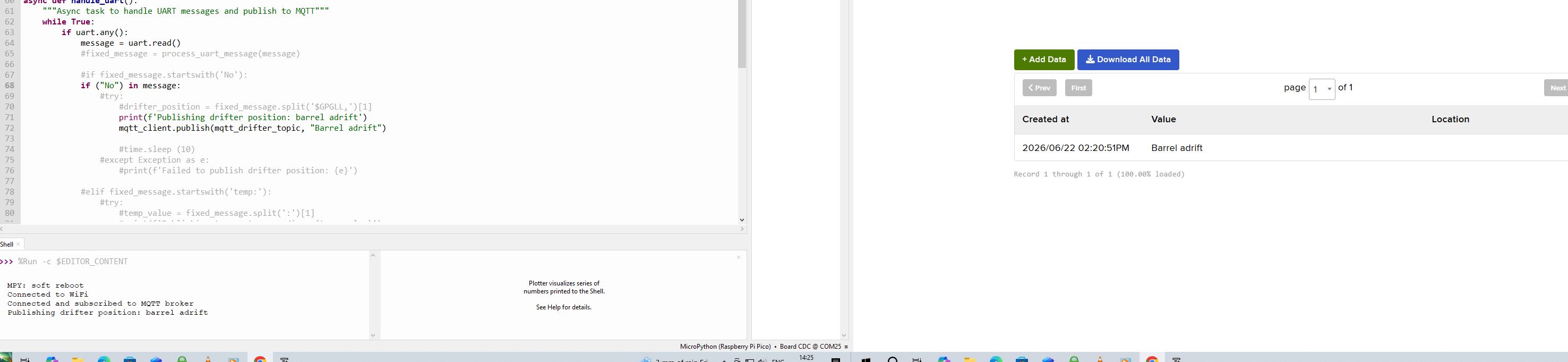
Ive been trying to use a word eg “Drifter” from a message to trigger a mqtt_client.publish see code below
If I receive a normal message with the word Drifter included in the text the mqtt command works. However because I am receiving a Meshtastic Detection Sensor Friendly name “Drifter” with “detected” automatically appended it seems to be received in a different format that is not recognised and will not trigger the mqqt command. As mentioned in the tutorial I have tried inserting a space between the friendly message and the append but it make no difference How can I use the Detection Sensor generated message to trigger a mqqt command?
async def handle_uart():
“”“Async task to handle UART messages and publish to MQTT”“”
while True:
if uart.any():
message = uart.read()
fixed_message = process_uart_message(message)
        #if fixed_message.includes('$GPGLL,'):
        if ("Drifter") in fixed_message:
            #try:
                #drifter_position = fixed_message.split('$GPGLL,')[1]
                print(f'Publishing drifter position: barrel adrift')
                mqtt_client.publish(mqtt_drifter_topic, "Barrel adrift")
This was a bit of a head scratcher, its been a while since I’ve seen this code, but I think there is an easy fix!
When we receive a message, it ussually looks like “name_of_device: message”.
When we use the line
message = uart.read()
We get this full message format. The next thing we do is run it through the function:
fixed_message = process_uart_message(message)
Which does some error handling, but more importantly removes the name_of_device: part of the received text so that we are only left with “message”.
When you put “Drifter” in the message, it makes it to the end, but when you set “Drifter” as the name of the device, it gets stripped out when you run it through this function.
You will need to modify the process_uart_message to not strip the name_of_sender off.
Ive hashed out the message processing lines. Should be looking at the unstripped raw uart message. Ive substitued the trigger word as “No” The command line if ("No ") in message: should find the trigger word amongst the gobblygook. If I send a normal Meshtastic message containing No the trigger works and prints and publishes to mqqt. Unfortunately the word No sent from Meshtastic Detection Sensor does not work as a trigger. Do you have an idea what the Detection Sensor “string” looks like. Ive tried commas, spaces, node id numbers with out success
wlan.active(True)
wlan.connect(wifi_ssid, wifi_password)
while not wlan.isconnected():
print(‘Waiting for connection…’)
time.sleep(1)
led.toggle()
print(“Connected to WiFi”)
led.on()
return wlan
#if colon_space_pos != -1:
    #extracted_message = raw_message[colon_space_pos + 2:-2]
    #try:
        #decoded_message = extracted_message.decode('utf-8')
        #return decoded_message
    #except UnicodeDecodeError:
        #return "Decoding error occurred with the extracted message."
#else:
   # return "Delimiter ': ' not found in the message."
def mqtt_subscription_callback(topic, message):
“”“Handle incoming MQTT messages by forwarding them to UART”“”
print(f’Topic {topic} received message {message}')
Forward the message to UART
uart.write(message + b’\r\n’)
async def handle_uart():
“”“Async task to handle UART messages and publish to MQTT”“”
while True:
if uart.any():
message = uart.read() #fixed_message = process_uart_message(message)
        #if fixed_message.startswith('No'):
        if ("No ") in message:
            #try:
                #drifter_position = fixed_message.split('$GPGLL,')[1]
                print(f'Publishing drifter position: barrel adrift')
                mqtt_client.publish(mqtt_drifter_topic, "Barrel adrift")

                #time.sleep (10)
            #except Exception as e:
After the message and fixed message variables, could you please put in the below so we can see if anything funky is going:
print(repr(message))
print(repr(fixed_message))
Then try sending the trigger message. Regardless of what message you receive, it will output to the serial monitor so we can see anything that’s tripping the if statement or the fixed_message function.
EDIT: Oops, forgot my repr() functions. Fixed now.
Sorry about the slow response, but my Drifter project got mangled by a boat propellor, so I had some hardware to rebuild including the underwater housing
I put those lines, you gave me, into the program but unfortunately it doesnt show the message generated by the Detection sensor. If I type in a message on the same device with the same “friendly name” (Drifter detected) it works and your print(repr(message)) displays and triggers a mqtt publication
MPY: soft reboot
Connected to WiFi
Connected and subscribed to MQTT broker
Publishing drifter position: barrel adrift
b’\r\n2c30: Drifter\r\n’
The sensor detection message is received and displayed in messages but will not work as a trigger
AI says this about the difference between a standard meshtastic messaging and Sensor detection module messaging of “friendly names”
“Yes, a “friendly message” from the Detection Sensor module is structurally different from a standard Meshtastic text message. While a standard message uses the payload type reserved for general text, a detection sensor message is sent over the network with its own specific PORTNUM code and is auto-generated.” [1]
By configuring the Meshtastic device to LOST_AND_FOUND mode which will periodically broadcast position as a message. Unlike the Detection Sensor module packets the message from lost and found is recognised by your micro python script and can be used as a trigger