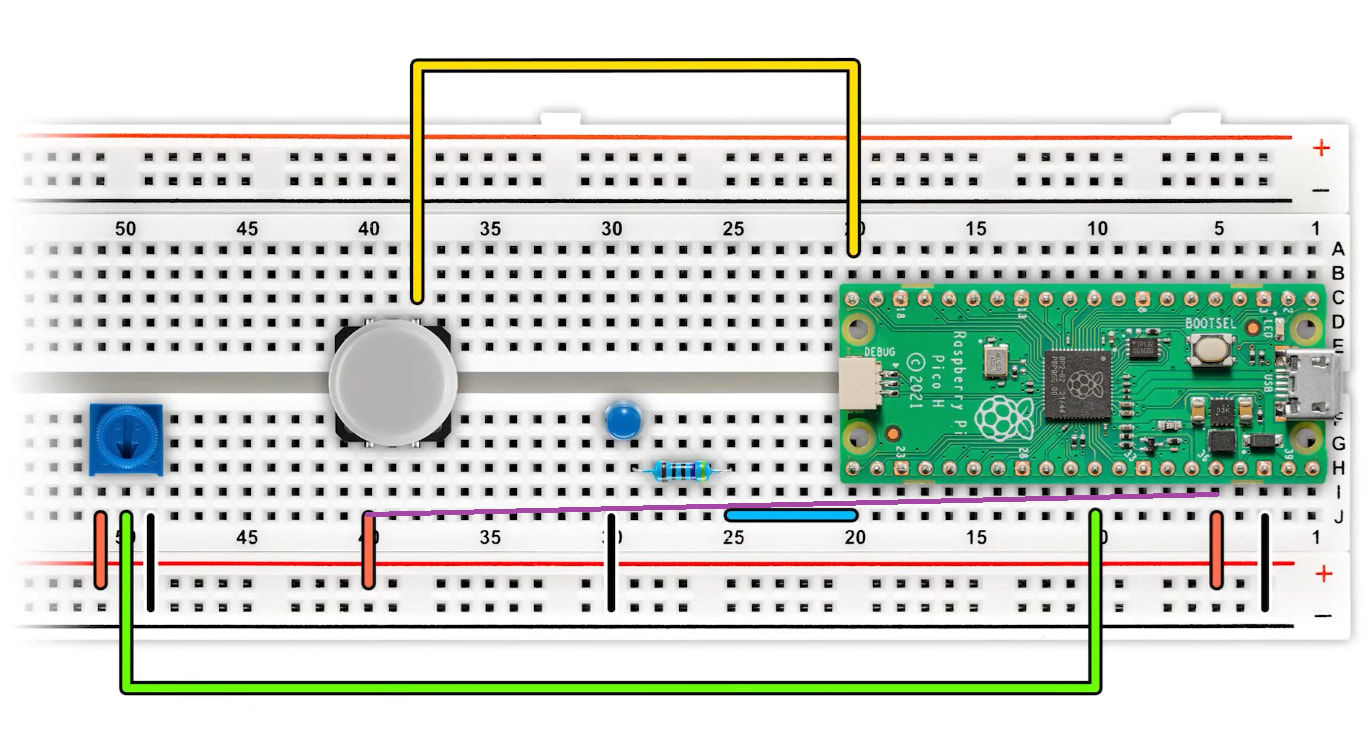
Hello, I was following the entire 4 hour pico tutorial and I’ve encountered a weird problem that chatgpt or any ai has a problem to explain too.
Here is a photo of what I have achieved for now
Now my problem is, on this example diagram, button is connected to the - below, however, it does not work at my side. It works only when I pin it next to pin36 on a board right next to the pico. Why does it happen and what could be the fix? I have everything exactly how on the photo provided below but the entirety works only after pinning bottom button wire to pin36
Hi Merwash
I would say at a guess you have a problematic breadboard.
I did not see that thin purple line on the lower pic. It would probably have helped if you had specified Pico pin 36. I was initially wondering why nothing appeared to be connected to breadboard 36.
If you have been in the habit of inserting header pins into this board in this area you may have a dodgy female contact. This has been the subject of discussion recently with the cheaper variety of these boards have been coming up with unreliable female contacts in the board if subject to maximum stressing with these larger pins.
Try moving the Pico say 10 contacts or more to the left. This might get better contacts. You will have to squeeze everything up a bit but that would not matter. These boards are only meant for the experimental phase not permanent use.
Cheers Bob
@Mewash315666 I’d lean the same way as @Robert93820 this looks much more like a breadboard rail/contact issue than a code issue.
If moving the button wire from the - rail to a nearby Pico pin makes it start working, that usually means the - rail section you’re using is not electrically connected to the Pico ground point the way it appears to be. On a lot of breadboards that happens because:
the power rail is split in the middle
the rail jumper is in a different section
or that particular socket/rail contact is a bit dodgy
The quickest checks are:
try the same wire in a few other holes on that - rail
add a short jumper linking the two halves of the - rail
move the Pico and button to a different part of the breadboard and see if the behaviour follows
If you have a multimeter, continuity mode between the button’s - rail hole and the Pico ground connection will tell you straight away.
The only other thing I could think of could be a problem with the bridging of the two halves of the breadboard’s +ve and -ve power rows. Some breadboards will have a gap in the middle where the power rails disconnect, and this might be causing a break in your circuitry somehow if the two halves aren’t bridged.
If you can point out which Pico pin number you’ve moved it to, I can help compare it against the tutorial wiring a bit more closely.
Hi Liam
In all the breadboards I have (not many) any break in the power rail strip is indicated by a gap in the red or blue line printed on the board. Don’t know about the cheaper varieties.
Easy enough checked. Insert a wire in each end and measure continuity. Not exactly rocket science.
Been 6 days now so we will probably never know.
Cheers Bob
It might also be worth checking for a floating input or wiring issue around the button. I’ve had a Pico behave unpredictably before because a pull-up/pull-down resistor wasn’t configured the way I expected.