Another object detection guide, this time on YOLOE - a wickedly cool YOLO model that runs off prompts! Instead of being trained to identify explicit categories and objects, it has been instead trained on the visual concepts that make up that object. This means you can prompt it with normal human text (e.g. blue cup, pokeball, pink keyboard), and it is able to detect these objects despite never seeing them before! This is by far the easiest and quickest way to create custom object detection models, and it is light-weight enough that we achieve all of this on a Pi 5 in seconds! If you have a Pi 5 lying around, give it a go, it’s a good heap of fun for a quick project
Great question, YOLO (You Only Look Once) is the original object detection model that identifies a fixed set of pre-trained categories. YOLOE is a newer variant that uses text prompts instead of fixed labels. So rather than being limited to, say, “dog” or “car,” you can tell YOLOE to look for a “red mug” or “vintage camera”, even if it hasn’t seen those exact things during training.
It’s a lot more flexible, especially for custom or niche use cases. Perfect fit for a quick Pi 5 project!
You might wanna check out OpenCV, our guides used to use it, but recently Picamera 2 has become the standard for Pis. Large language models like ChatGPT and Claude are very well versed in this and should be able to help you adapt the code!
I have used your tutorial Getting Started with YOLO Object and Animal Recognition on the Raspberry Pi to successfully run YOLO11n with my Pi5 & Pi camera V2. I have now found your tutorial “Custom Object Detection Models Without Training | YOLOE & Raspberry Pi” and want to try running YOLOE on the same hardware. When I copied your python code from the associated tutorial on 11/8, then I get a 0.5 FPS feed with no bounding boxes and the following message in Thonny: [3:32:04.159114255] [3268] INFO Camera camera_manager.cpp:326 libcamera v0.5.0+59-d83ff0a4
[3:32:04.166638393] [3273] INFO RPI pisp.cpp:720 libpisp version v1.2.1 981977ff21f3 29-04-2025 (14:13:50)
[3:32:04.176446262] [3273] INFO RPI pisp.cpp:1179 Registered camera /base/axi/pcie@1000120000/rp1/i2c@80000/imx219@10 to CFE device /dev/media0 and ISP device /dev/media2 using PiSP variant BCM2712_D0
[3:32:04.180502814] [3268] INFO Camera camera.cpp:1205 configuring streams: (0) 800x800-RGB888 (1) 1640x1232-BGGR_PISP_COMP1
[3:32:04.180645518] [3273] INFO RPI pisp.cpp:1483 Sensor: /base/axi/pcie@1000120000/rp1/i2c@80000/imx219@10 - Selected sensor format: 1640x1232-SBGGR10_1X10 - Selected CFE format: 1640x1232-PC1B
Ultralytics 8.3.100 🚀 Python-3.11.2 torch-2.7.1+cpu CPU (Cortex-A76)
YOLOe-11s-seg summary (fused): 137 layers, 13,693,398 parameters, 1,857,958 gradients, 36.4 GFLOPs
Ultralytics 8.3.100 🚀 Python-3.11.2 torch-2.7.1+cpu CPU (Cortex-A76)
Ultralytics 8.3.100 🚀 Python-3.11.2 torch-2.7.1+cpu CPU (Cortex-A76)
Ultralytics 8.3.100 🚀 Python-3.11.2 torch-2.7.1+cpu CPU (Cortex-A76) (keeps repeating)
Do Have to reload Ultralytics as described in your YOLOE & Raspberry Pi tutorial, or are there some easy adjustments that can be made?
Could you share with us the code and model you are trying to run? The information being printed to the shell there looks mostly fine, Picamera2 spits out scary chunks of red text like that, but its just configuration information - perfectly normal.
YOLOE is a far more intensive model to run than YOLOn, and 0.5 FPS out of the box is pretty standard. In the guide, we convert the model to the ONNX format and drop the resolution a little bit to squeeze some more out of it (2-10fps is pretty reasonable for YOLOE on a Pi 5).
It has been a while since I developed that guide, but I remember running into an issue where I was getting no detections. I can’t remember the exact configuration, but it had something to do with trying to use a non-ONNX model in prompt mode. We had a whole heap of issues with trying to run the default model, so we converted it to ONNX like we do in the guide and tried and run the demo codes. The written guide is a little easier to follow as well!
Looking at your version, you have version 8.3.100 of Ultralytics installed. This should work fine, but it is a few versions out of date. Unsure if you would get a performance boost, but we do have a guide on how to update to the newer versions (there is a specific method required now).
The attached yoloeTest.py code uses the yoloe-11s-seg.pt model and runs at 0.5FPS.
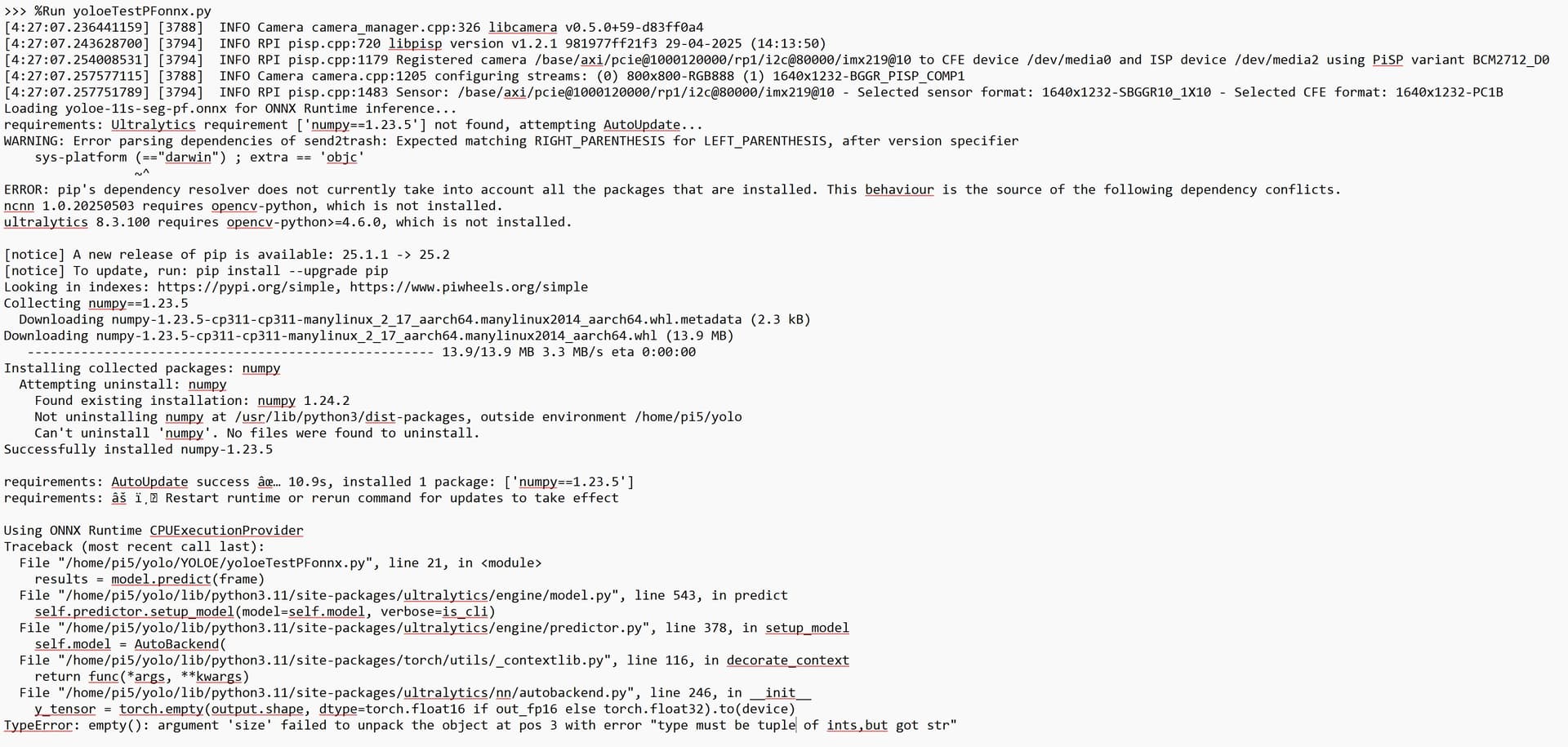
Following your advice, I attempted to convert it to ONNX format using your Prompt-Free ONNX Conversion.py (see attached yoloeTestPFonnx.py), but this code resulted in the attached error message.
I don’t want to take more of your time on trying to increase the YOLOE FPS as it’s unlikely to meet my requirement for real time tracking at >20 FPS. Your tutorials have all been excellent, and I hoping to achieve my helmet mounted camera tracking objectives by other means. I would be keen to exchange ideas with anybody else who is interested in real time camera tracking using computer vision or any other means such as GPS, UWB etc.
I am sceptical that you could get 20fps out of YOLOE on the Pi and it being useful for your use case. To attain that FPS, you would need to lower the processing resolution quite a bit, and this would lower the detection range quite a bit. So possible to get close to that FPS, but the detection range might not be suitable - depends what you are doing.
As for that error, did you follow our standard YOLO guide then try to get YOLOE going with it? If so it would create an error like that. We have a more robust installation guide that solves the issues you are seeing there, that you might wanna check out.
In terms of getting 20fps on a YOLO model, the standard YOLO11n model could get that with better performance (just not the deteciton capabilities of YOLOE). You would need to lower the resolution a tad still, but in the guide you were following we convert it to the NCNN format which REALLY speeds things up.
can i use YOLOE with the raspberry ai camera and a rasberry5, if so how? since the guide for the installation of Ultralytics it says that I cannot use the ai camera so what should I do? (sorry for the English I’m using the translator)
I don’t think that YOLOE can run on the AI Camera.
When you use the AI Camera, the model is uploaded to the camera. However, the camera only has 8mb of memory to store models. YOLOE is about 50mb, so it is too large to fit on it. There are ways to shrink models with something called “quantisation”, but I don’t think you could make it small enough.