This is a placeholder topic for “2.42inch OLED Display Module (128x64px)” comments.

A great display for showing information from a microcontroller.
Read moreThis is a placeholder topic for “2.42inch OLED Display Module (128x64px)” comments.
A great display for showing information from a microcontroller.
Read moreI have a Waveshare 2.42inch OLED that I’m trying to connect to a Raspberry Pi Pico 2W, except nothing seems to be working and no matter what I try the screen remains black
Hi Joyce,
Welcome to the forum!
Is this the OLED you have? Large OLED I2C Display (SSD1309) | Buy in Australia | CE09964 | Core Electronics
Could you please send through a photo of how you have everything connected?
And a copy of your code?
We’ll take a look and get to the bottom of it!
Liam
Hi,
I have the 2.42inch OLED Display Module (128x64px).
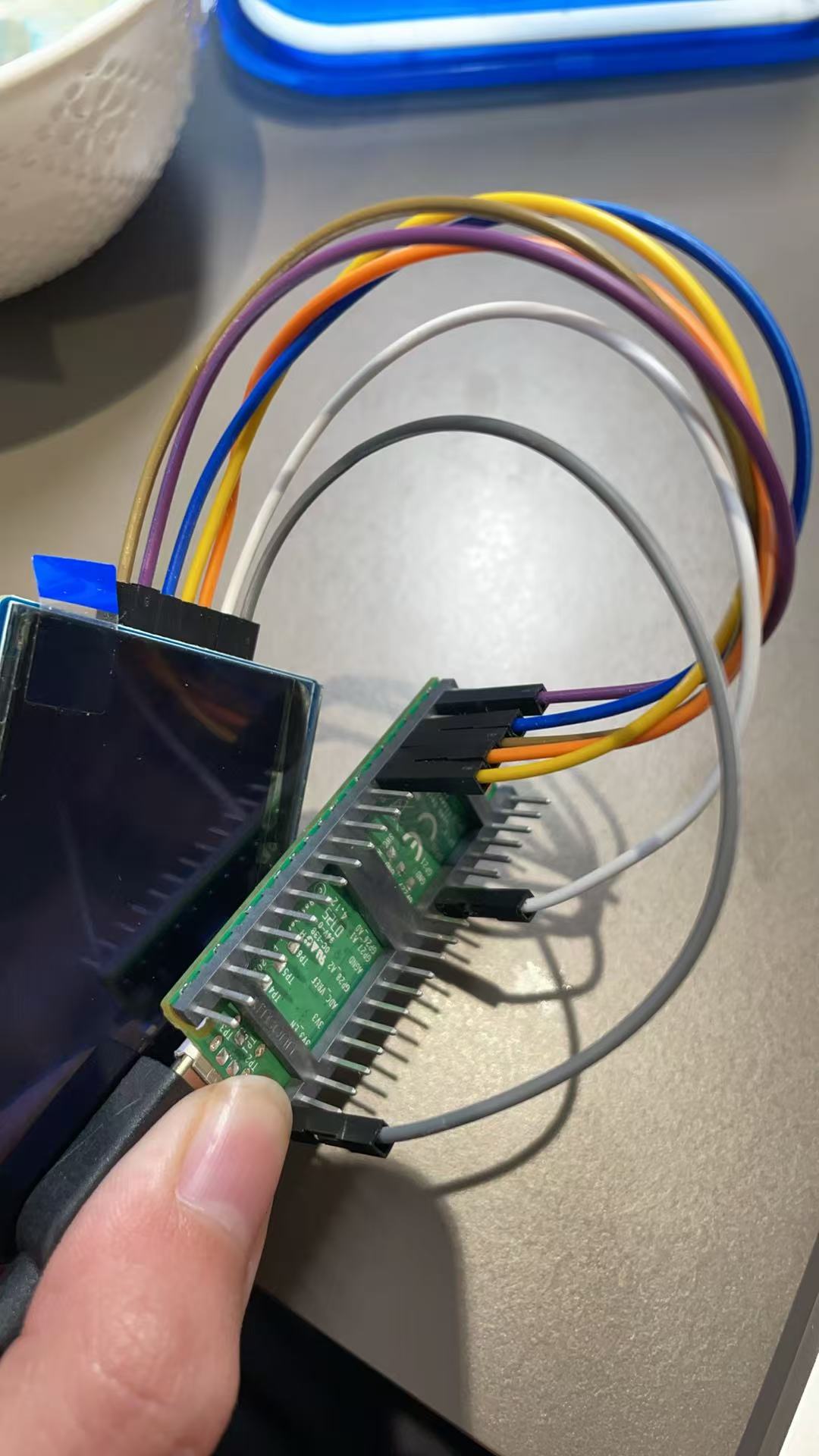
I attached how everything connects and the code! The pico and display is plugged into my laptop through a usb cable.
(Attachment Pico-OLED-2.42.py is missing)
Apparently I cannot send a .py file.
Here is the code:
from machine import Pin,SPI,I2C
import framebuf
import time

# Pin definition
SCK = 10
MOSI = 11
RST = 12
CS = 13
DC = 14

Device_SPI = 1
Device_I2C = 0

if(Device_SPI == 1):
Device = Device_SPI
else :
Device = Device_I2C

class OLED_2inch42(framebuf.FrameBuffer):
def __init__(self):
self.width = 128
self.height = 64
self.white = 0xffff
self.balck = 0x0000

self.cs = Pin(CS ,Pin.OUT)
self.rst = Pin(RST,Pin.OUT)
self.dc = Pin(DC ,Pin.OUT)

if(Device == Device_SPI):
self.cs(1)
self.spi = SPI(1)
self.spi = SPI(1,1000_000)
self.spi = SPI(1,10000_000,polarity=0, phase=0,sck=Pin(SCK),mosi=Pin(MOSI),miso=None)
self.dc(1)
else :
self.dc(0)
self.cs(0)
self.i2c = I2C(0, scl=Pin(9), sda=Pin(8), freq=1000000)
self.temp = bytearray(2)
self.buffer = bytearray(self.height * self.width // 8)
super().__init__(self.buffer, self.width, self.height, framebuf.MONO_VLSB)
self.init_display()

def write_cmd(self, cmd):
if(Device == Device_SPI):
self.cs(1)
self.dc(0)
self.cs(0)
self.spi.write(bytearray([cmd]))
self.cs(1)
else :
self.temp[0] = 0x00 # Co=1, D/C#=0
self.temp[1] = cmd
self.i2c.writeto(0x3c, self.temp)

def write_data(self, buf):
if(Device == Device_SPI):
self.cs(1)
self.dc(1)
self.cs(0)
self.spi.write(bytearray([buf]))
self.cs(1)
else :
self.temp[0] = 0x40 # Co=1, D/C#=0
self.temp[1] = buf
self.i2c.writeto(0x3c, self.temp)

def init_display(self):
"""Initialize dispaly"""
self.rst(1)
time.sleep(0.001)
self.rst(0)
time.sleep(0.01)
self.rst(1)

self.write_cmd(0xAE)# Turn off the display

self.write_cmd(0x00)# Set low column address
self.write_cmd(0x10)# Set high column address

self.write_cmd(0x20)# Set memory addressing mode
self.write_cmd(0x00)# Horizontal addressing mode

self.write_cmd(0xC8)# Set COM scan direction
self.write_cmd(0xA6)# Set normal/inverse display

self.write_cmd(0xA8)# Set multiplex ratio
self.write_cmd(0x3F)# Set ratio to 63

self.write_cmd(0xD3)# Set display offset
self.write_cmd(0x00)# Offset value is 0

self.write_cmd(0xD5)# Set display clock divide ratio/oscillator frequency
self.write_cmd(0x80)# Default divide ratio

self.write_cmd(0xD9)# Set pre-charge period
self.write_cmd(0x22)# Default value

self.write_cmd(0xDA)# Set COM pin configuration
self.write_cmd(0x12)# Default configuration

self.write_cmd(0xDB)# Set VCOMH
self.write_cmd(0x40)# Default value

self.write_cmd(0xA1)# Set segment remap
self.write_cmd(0xAF)# Turn on the display

def show(self):
for page in range(0,8):
self.write_cmd(0xb0 + page)
self.write_cmd(0x04)
self.write_cmd(0x00)
if(Device == Device_SPI):
self.dc(1)
for num in range(0,128):
self.write_data(self.buffer[page*128+num])

if __name__=='__main__':

OLED = OLED_2inch42()

OLED.fill(0x0000)
OLED.show()
OLED.rect(0,0,127,63,OLED.white)
OLED.rect(10,6,20,20,OLED.white)
time.sleep(0.5)
OLED.show()
OLED.fill_rect(40,6,20,20,OLED.white)
time.sleep(0.5)
OLED.show()
OLED.rect(70,6,20,20,OLED.white)
time.sleep(0.5)
OLED.show()
OLED.fill_rect(100,6,20,20,OLED.white)
time.sleep(0.5)
OLED.show()

time.sleep(1)

OLED.fill(0x0000)
OLED.line(0,0,5,63,OLED.white)
OLED.show()
time.sleep(0.01)
OLED.line(0,0,20,63,OLED.white)
OLED.show()
time.sleep(0.01)
OLED.line(0,0,35,63,OLED.white)
OLED.show()
time.sleep(0.01)
OLED.line(0,0,65,63,OLED.white)
OLED.show()
time.sleep(0.01)
OLED.line(0,0,95,63,OLED.white)
OLED.show()
time.sleep(0.01)
OLED.line(0,0,125,63,OLED.white)
OLED.show()
time.sleep(0.01)
OLED.line(0,0,125,63,OLED.white)
OLED.show()
time.sleep(0.1)
OLED.line(0,0,125,63,OLED.white)
OLED.show()
time.sleep(0.01)
OLED.line(0,0,125,63,OLED.white)
OLED.show()
time.sleep(0.01)

OLED.line(127,1,125,63,OLED.white)
OLED.show()
time.sleep(0.01)
OLED.line(127,1,110,63,OLED.white)
OLED.show()
time.sleep(0.01)
OLED.line(127,1,95,63,OLED.white)
OLED.show()
time.sleep(0.01)
OLED.line(127,1,65,63,OLED.white)
OLED.show()
time.sleep(0.01)
OLED.line(127,1,35,63,OLED.white)
OLED.show()
time.sleep(0.01)
OLED.line(127,1,1,63,OLED.white)
OLED.show()
time.sleep(0.01)
OLED.line(127,1,1,63,OLED.white)
OLED.show()
time.sleep(0.01)
OLED.line(127,1,1,63,OLED.white)
OLED.show()
time.sleep(0.01)
OLED.line(127,1,1,1,OLED.white)
OLED.show()
time.sleep(1)

OLED.fill(0x0000)
OLED.text("128 x 64 Pixels",0,2,OLED.white)
OLED.text("Pico-OLED-2.42",0,12,OLED.white)
OLED.text("SSD1309",0,22,OLED.white)
OLED.text("Waveshare",0,32,OLED.white)
OLED.show()

time.sleep(1)
OLED.fill(0xFFFF)
Hi @Joyce305851 ,
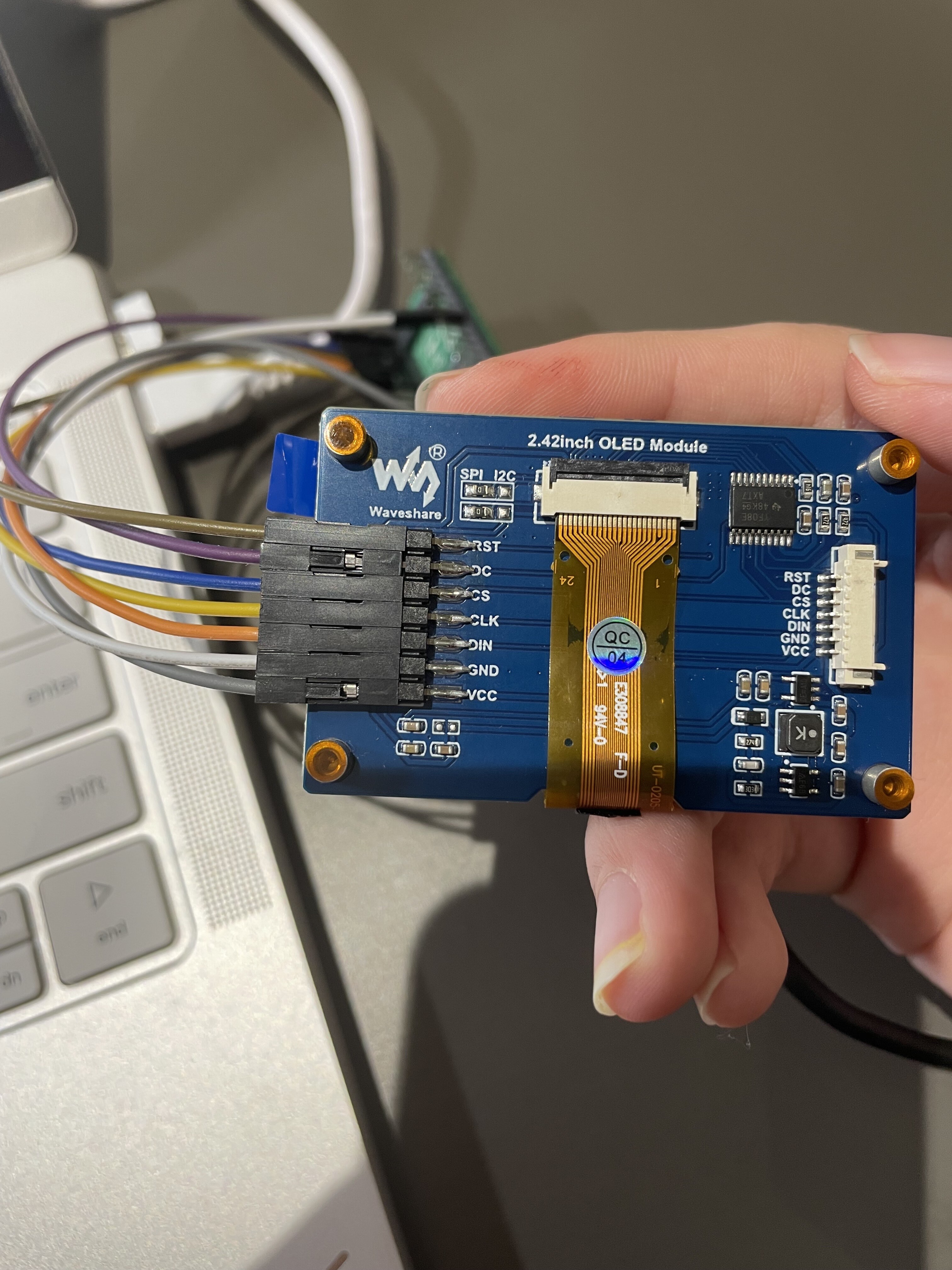
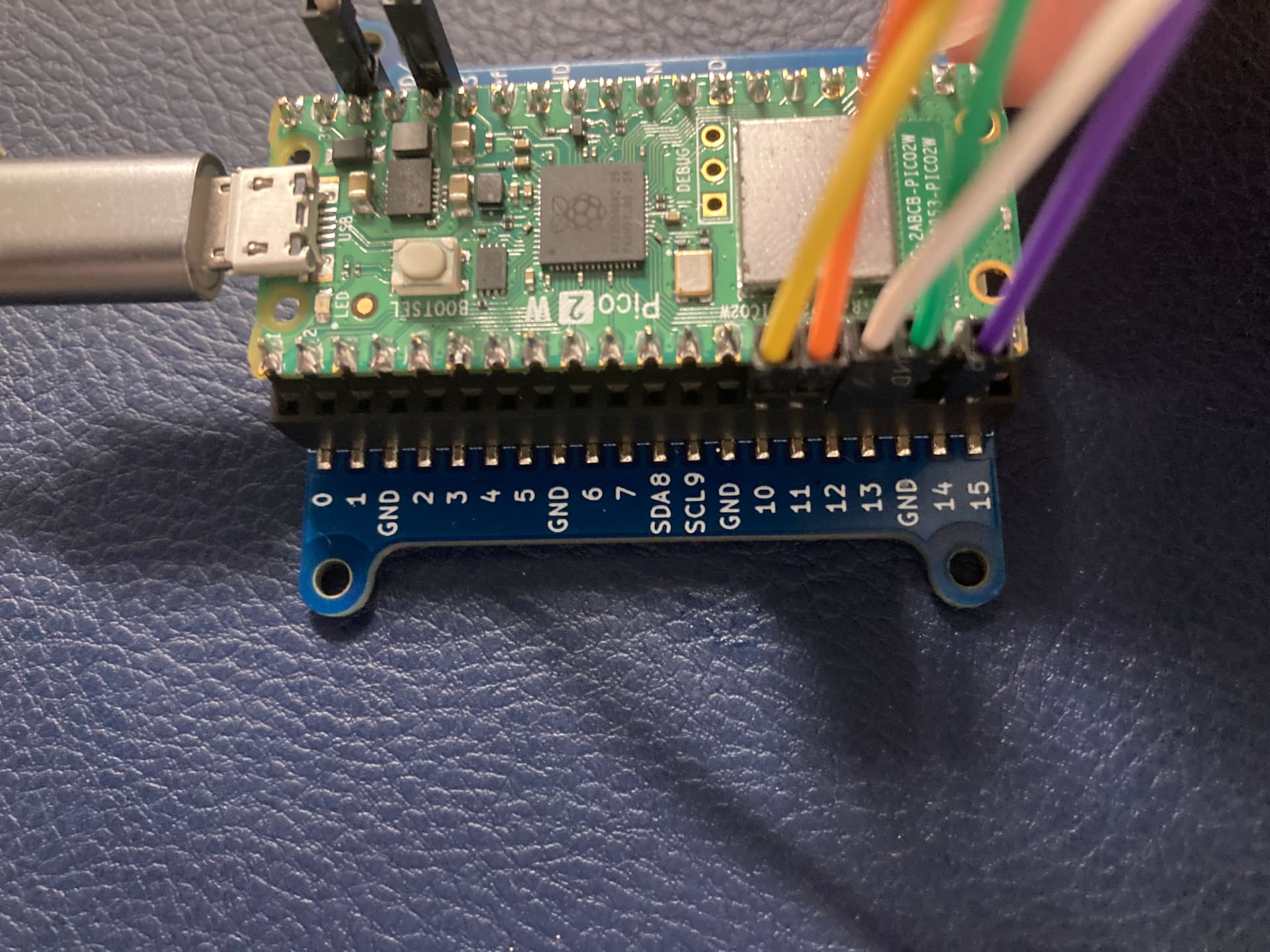
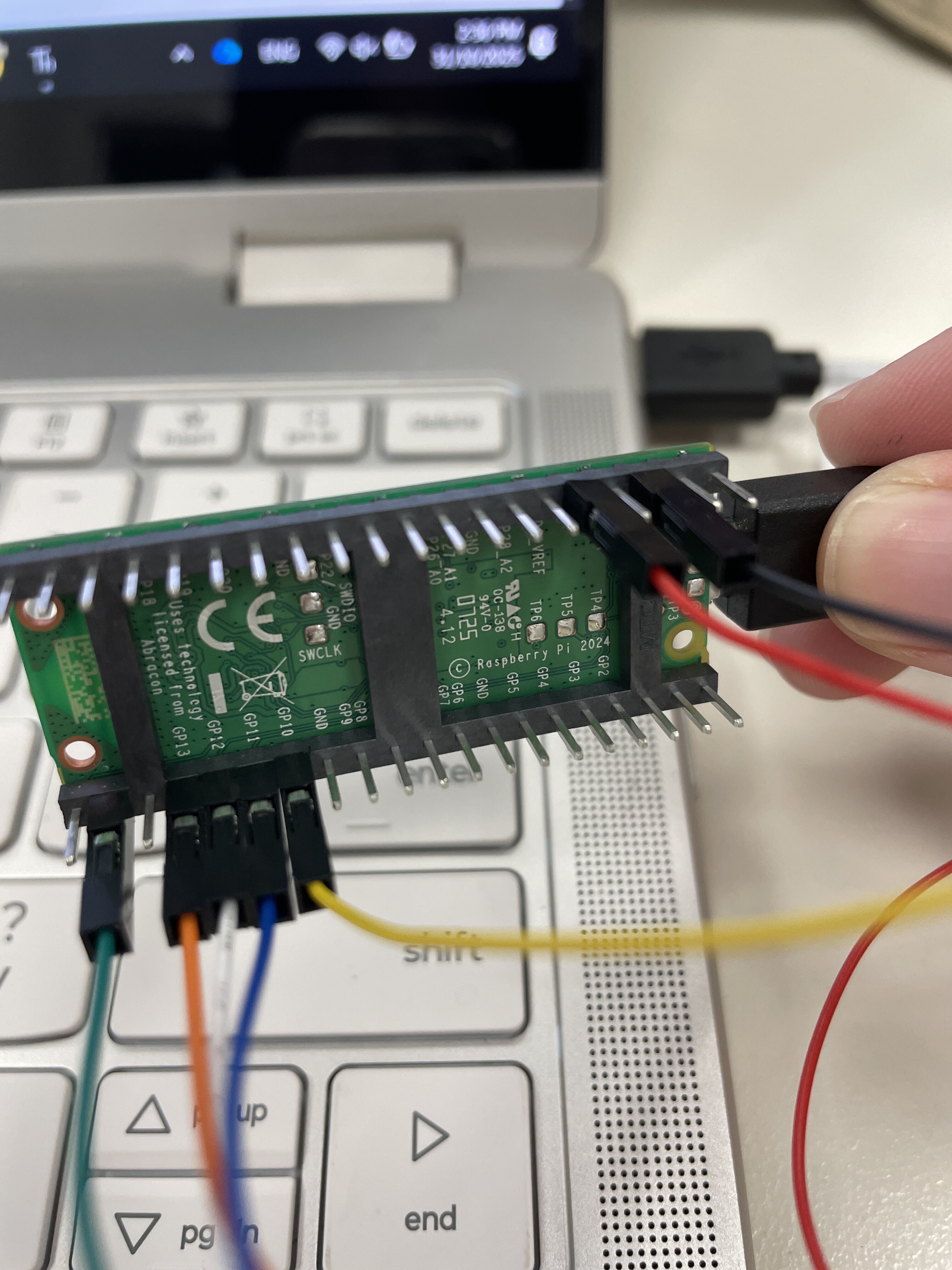
Would you be able to take a few more photos of the back side of the display, as well as a photo of the Pico from directly above the pins? It’s a little hard to make out what pins are being used for what from the photo you attached.
Hey there, Joyce,
I know that the web page says that the OLED Module can take 5V, but on the wiki they specifically suggest using the 3.3V for VCC:
It might be worth switching that up and seeing if that helps.
I will try it again but it did not work for me last time.
No luck with the display…
Hey @Joyce305851 ,
Would you be able to share an update of your current setup? Photos of the wiring and the current code would be useful.
I put together a quick test using new hardware and was able to get this display working as expected using this example code:
from machine import Pin,SPI,I2C
import framebuf
import time

# Pin definition
SCK  =  10
MOSI =  11
RST  =  12
CS   =  13
DC   =  14

Device_SPI = 1
Device_I2C = 0

if(Device_SPI == 1):
    Device = Device_SPI
else :
    Device = Device_I2C

class OLED_1inch54(framebuf.FrameBuffer):
    def __init__(self):
        self.width  =  128
        self.height =  64
        self.white  =  0xffff
        self.balck  =  0x0000

        self.cs  =  Pin(CS ,Pin.OUT)
        self.rst =  Pin(RST,Pin.OUT)
        self.dc  =  Pin(DC ,Pin.OUT)

        if(Device == Device_SPI):
            self.cs(1)
            self.spi = SPI(1)
            self.spi = SPI(1,1000_000)
            self.spi = SPI(1,10000_000,polarity=0, phase=0,sck=Pin(SCK),mosi=Pin(MOSI),miso=None)
            self.dc(1)
        else :
            self.dc(0)
            self.cs(0)
            self.i2c = I2C(0, scl=Pin(9), sda=Pin(8), freq=1000000)
            self.temp = bytearray(2)
        self.buffer = bytearray(self.height * self.width // 8)
        super().__init__(self.buffer, self.width, self.height, framebuf.MONO_VLSB)
        self.init_display()

    def write_cmd(self, cmd):
        if(Device == Device_SPI):
            self.cs(1)
            self.dc(0)
            self.cs(0)
            self.spi.write(bytearray([cmd]))
            self.cs(1)
        else :
            self.temp[0] = 0x00 # Co=1, D/C#=0
            self.temp[1] = cmd
            self.i2c.writeto(0x3c, self.temp)

    def write_data(self, buf):
        if(Device == Device_SPI):
            self.cs(1)
            self.dc(1)
            self.cs(0)
            self.spi.write(bytearray([buf]))
            self.cs(1)
        else :
            self.temp[0] = 0x40 # Co=1, D/C#=0
            self.temp[1] = buf
            self.i2c.writeto(0x3c, self.temp)

    def init_display(self):
        """Initialize dispaly"""
        self.rst(1)
        time.sleep(0.001)
        self.rst(0)
        time.sleep(0.01)
        self.rst(1)

        self.write_cmd(0xAE)# Turn off the display

        self.write_cmd(0x00)# Set low column address
        self.write_cmd(0x10)# Set high column address

        self.write_cmd(0x20)# Set memory addressing mode
        self.write_cmd(0x00)# Horizontal addressing mode

        self.write_cmd(0xC8)# Set COM scan direction
        self.write_cmd(0xA6)# Set normal/inverse display

        self.write_cmd(0xA8)# Set multiplex ratio
        self.write_cmd(0x3F)# Set ratio to 63

        self.write_cmd(0xD3)# Set display offset
        self.write_cmd(0x00)# Offset value is 0

        self.write_cmd(0xD5)# Set display clock divide ratio/oscillator frequency
        self.write_cmd(0x80)# Default divide ratio

        self.write_cmd(0xD9)# Set pre-charge period
        self.write_cmd(0x22)# Default value

        self.write_cmd(0xDA)# Set COM pin configuration
        self.write_cmd(0x12)# Default configuration

        self.write_cmd(0xDB)# Set VCOMH
        self.write_cmd(0x40)# Default value

        self.write_cmd(0xA1)# Set segment remap
        self.write_cmd(0xAF)# Turn on the display

    def show(self):
        for page in range(0,8):
            self.write_cmd(0xb0 + page)
            self.write_cmd(0x04)
            self.write_cmd(0x00)
            if(Device == Device_SPI):
                self.dc(1)
            for num in range(0,128):
                self.write_data(self.buffer[page*128+num])


if __name__=='__main__':


    OLED = OLED_1inch54()

    OLED.fill(0x0000)
    OLED.show()
    OLED.rect(0,0,127,63,OLED.white)
    OLED.rect(10,6,20,20,OLED.white)
    time.sleep(0.5)
    OLED.show()
    OLED.fill_rect(40,6,20,20,OLED.white)
    time.sleep(0.5)
    OLED.show()
    OLED.rect(70,6,20,20,OLED.white)
    time.sleep(0.5)
    OLED.show()
    OLED.fill_rect(100,6,20,20,OLED.white)
    time.sleep(0.5)
    OLED.show()

    time.sleep(1)

    OLED.fill(0x0000)
    OLED.line(0,0,5,63,OLED.white)
    OLED.show()
    time.sleep(0.01)
    OLED.line(0,0,20,63,OLED.white)
    OLED.show()
    time.sleep(0.01)
    OLED.line(0,0,35,63,OLED.white)
    OLED.show()
    time.sleep(0.01)
    OLED.line(0,0,65,63,OLED.white)
    OLED.show()
    time.sleep(0.01)
    OLED.line(0,0,95,63,OLED.white)
    OLED.show()
    time.sleep(0.01)
    OLED.line(0,0,125,63,OLED.white)
    OLED.show()
    time.sleep(0.01)
    OLED.line(0,0,125,63,OLED.white)
    OLED.show()
    time.sleep(0.1)
    OLED.line(0,0,125,63,OLED.white)
    OLED.show()
    time.sleep(0.01)
    OLED.line(0,0,125,63,OLED.white)
    OLED.show()
    time.sleep(0.01)

    OLED.line(127,1,125,63,OLED.white)
    OLED.show()
    time.sleep(0.01)
    OLED.line(127,1,110,63,OLED.white)
    OLED.show()
    time.sleep(0.01)
    OLED.line(127,1,95,63,OLED.white)
    OLED.show()
    time.sleep(0.01)
    OLED.line(127,1,65,63,OLED.white)
    OLED.show()
    time.sleep(0.01)
    OLED.line(127,1,35,63,OLED.white)
    OLED.show()
    time.sleep(0.01)
    OLED.line(127,1,1,63,OLED.white)
    OLED.show()
    time.sleep(0.01)
    OLED.line(127,1,1,63,OLED.white)
    OLED.show()
    time.sleep(0.01)
    OLED.line(127,1,1,63,OLED.white)
    OLED.show()
    time.sleep(0.01)
    OLED.line(127,1,1,1,OLED.white)
    OLED.show()
    time.sleep(1)

    OLED.fill(0x0000)
    OLED.text("128 x 64 Pixels",0,2,OLED.white)
    OLED.text("Pico-OLED-1.54",0,12,OLED.white)
    OLED.text("SSD1309",0,22,OLED.white)
    OLED.text("Waveshare",0,32,OLED.white)
    OLED.show()

    time.sleep(1)
    OLED.fill(0xFFFF)
I used the wiring diagram sent by Jane above, and my final setup looks like this.
Hi Samuel
One difference that I can see without examining in detail.
You have the “EN” pin connected to somewhere.
The earlier pics don’t.
Cheers Bob
On closer examination that could be Gnd. Bit hard to tell exactly with some of these photos. A schematic much more accurate (or as accurate as you make it.)
I just tried to do the exact same setup as you did, the OLED still doesn’t seem to work.
Hey @Joyce305851 ,
Very frustrating, sorry to hear that didn’t work. Let’s see if we can isolate the problem to a specific part of your setup.
I see you are using jumper wires to connect this display to your breadboard. If you have any spares lying around, it would be a good idea to swap those in or otherwise verify that these wires are working as expected. You could also use a multimeter to confirm continuity.
If you could share some photos of your current setup for us to double-check, that may also be useful.
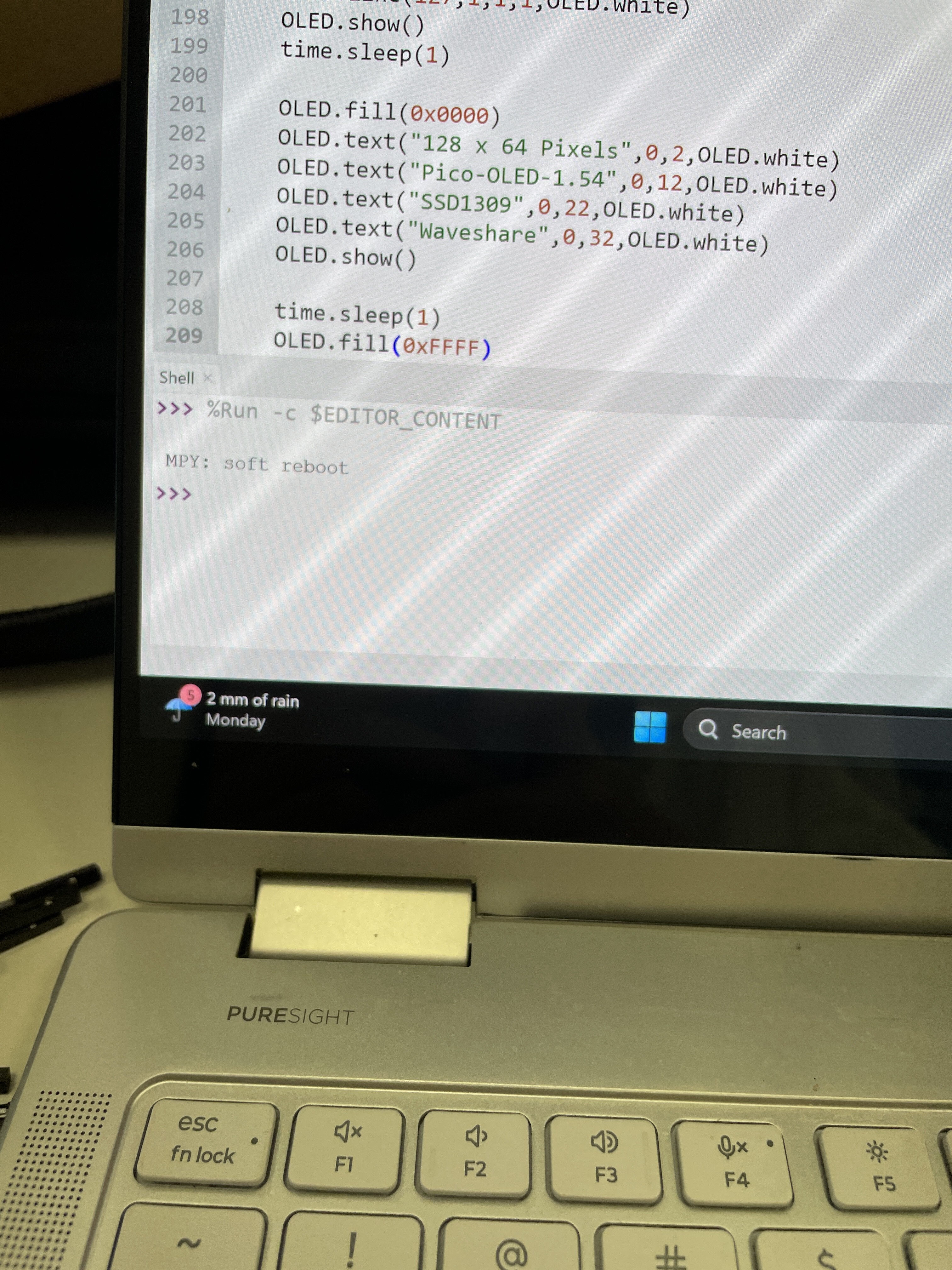
Lastly, do you get any kind of output while uploading the code to your Pico? Anything that could give us a hint towards what could be causing this problem. Feel free to copy and paste the output if needed.
Thanks for @Joyce305851, I think we can rule out the wiring then.
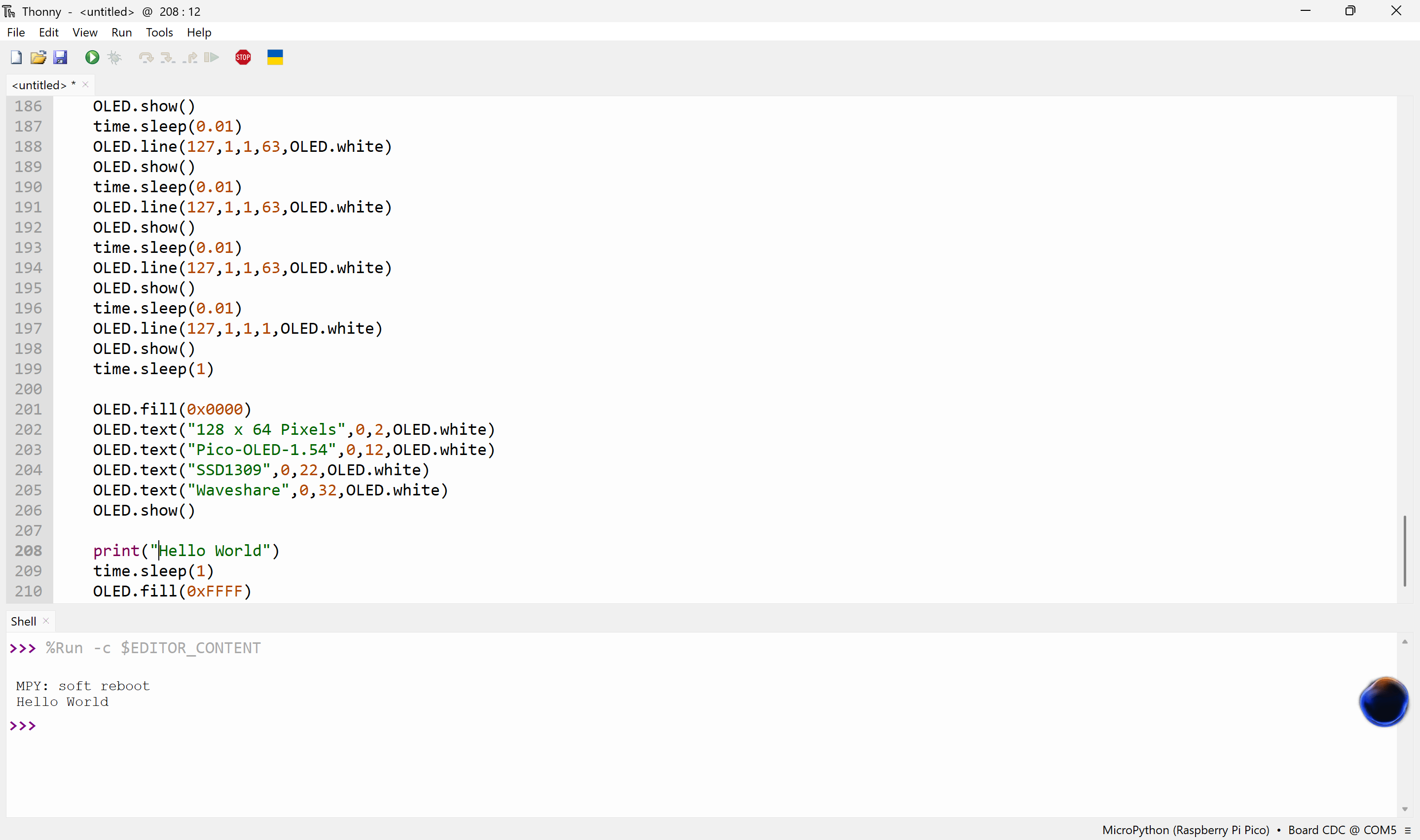
The Output MPY: soft reboot means that the program has run and the Pico is now going back into its default state.
Just to make sure that the program is running as expected, can I get you to throw a print("Hello World") just before that last time.sleep(1), run the program, and show us the output again please.
Just following up as this is a pretty urgent project I need to finish.
I got a new OLED and now its working, so I’m going to assume that the problematic one was just faulty. Thanks for the help anyways!
I’m glad the new one fixed the issue, but I’m sorry this has been such a drag for you, Joyce.
Hope the rest of the project goes well. 
And you can get our latest projects and tips straight away by following us on: