
needs a noctura fan 40X40X10mm ultra quiet fan modd physically
fan tripp points in config file adjusted accordingly if required will cool up to 30-50% better quiter and allow higher clocking of cpu
2 Likes
Argon ONE M.2 Case SKU: CE07434, is there a POE Hat that will fit this ?
1 Like
Hi,
Thanks for posting on the forum! Welcome to the community 
Unfortunately not that I’m aware of as a HAT, the problem is that you actually need to mount the GPIO on the inside of the case when fitting it:

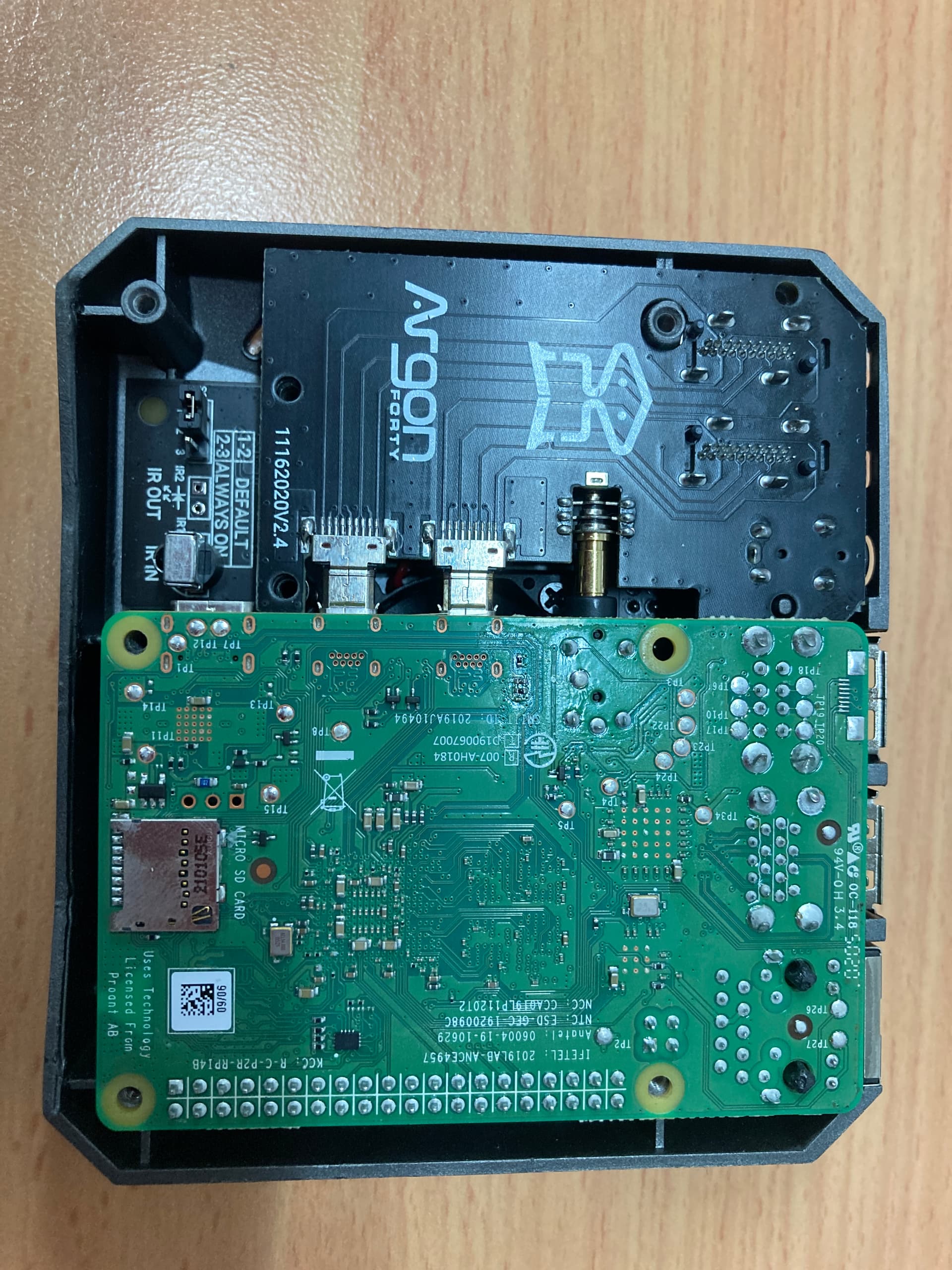
That being said, what you may be able to get away with is using a PoE splitter instead. For a Pi 4, this pair should do the trick to use PoE with an Argon One M2:
1 Like
does anyone know if this is compatible with the original Argon40 one case?
4 Likes
Hi Lance,
Welcome!
I couldn’t find the old Core page for the V1 case but from memory you used to be able to add the M.2 expansion on so should work no worries.
Heres a link that says it does as well: Argon ONE Guide – Wagner’s TechTalk
5 Likes
Hey Bryce
Thanks for all that, all ordered and received.
Just one thing.
Is the Splitter (ADA3785) supposed to pass through the POE ?
I can’t get it to.
or do I have a Dud ?
Tony
2 Likes
Hey Tony,
The PoE spltters don’t pass through the PoE on the ethernet cable, just the data. They split the power off, drop the voltage and output the power over the power cable (usb connector in this case).
3 Likes
This is to help anyone with argonone M.2 case installs if it does not go as planned.
Also for Core electronics to know what happened to my query from a phone message I left on Saturday and they rang me on Monday. I was impressed.
Bought an Argonone M.2 case and added it to a Raspi 4 -8gig that is about 2 years old with its official power supply. WD 1Tb SATA M.2 drive. Had been running ubuntu Mate 20.04. changed to latest Rasppi OS for install. Rasp pi sd card tools have improved in last 2 years, very useful if you are not a dd wizzard.
Saturday Followed nstructions in booklet and Utube Crosstalk solutions vid.
Could boot from SD. Unable to acess the argonone script via curl or their site by a web browser. Left message on Core electronics phone as I thought I might have a defective argone one case. Ordered another drive and different enclosure and some USB 3 male male and male female cables to be able to test more extensively.
3 days of google and reading.
Monday Core electronics rang from a message left Saturday and suggested their forum, so more reading.
Tried copying sd card to ssd in the pi,
then boot failed with this error–
“(some numbers I have not recorded) mmc1: controller never released inhit bit(s)”
after the multicoloured screenupdate and upgrade software,
More rounds of reflashing selecting USB booting, updateing rpi-eeprom-config then boot failed with this error–
“(some numbers I have not recorded) mmc1: controller never released inhit bit(s)”
after the multicoloured screen
Changed SATA ssd m2 card to a simplecon enclosure that I had.
Boot failed with same error.
sometimes getting a little further with multiple errors and hanging.
some error messages suggested ssd partition could be corrupt
hdparm -t /dev/sda gave about 40 Mb/sec for sd card, and a little less than that for the SATASSD if it worked at all!!!
Google suggested that /boot/cmdline.txt editing could help
-one option - sometimes UUID could be wrong, checked with blkid, and it was not.
-another option If the hard disk case manufacturer does not fully implement UAS Protocol or in system support UAS, then blocking UAS on that device and using another protocol, USB mass storage mode.
ArgononeM.2 case is on the known good list.
Simplecom case is on the known dodgy list
So find device ID
First look at the drive model
lsusb
Bus 002 Device 002: ID 152d:0578 JMicron Technology Corp. / JMicron USA Technology Corp. JMS567 SATA 6Gb/s bridge
Bus 002 Device 001: ID 1d6b:0003 Linux Foundation 3.0 root hub
Bus 001 Device 002: ID 2109:3431 VIA Labs, Inc. Hub
Bus 001 Device 001: ID 1d6b:0002 Linux Foundation 2.0 root hub
then
sudo nano /boot/cmdline.txt
Add… To the front of the file
"usb-storage.quirks=152d:0578:u "
(there is a space after the u) replace [152d:0578] For your Device ID found through lsusb Command.
This file is all one line.
this improved things a bit.
Recoppied the sd card and the SSD m2 card
Now could boot from usb enclosure ssd, but still the above message flashed up for a bit.
Then returned the SATA ssd m2 drive to the argon one case. It booted but still with the “mmc1: controller never released inhit bit(s)” error message displayed for a few seconds.
Removed the “usb-storage.quirks” entry from /boot/cmdline.txt. It booted but still with the “mmc1: controller never released inhit bit(s)” error message displayed for a few seconds.
Succeeded in curl download of argonone script. able to set fan speed.
Then to get the ubuntu mate onto the SSD, Appears 20.10 is better for USB booting rather than LTS 20.04. My process as Mate does not have a card copier.
rasppi OS on SD card in Pi in Argonone case
ubuntu mate 21.10 loaded onto another sd card on my linux computer with Rasp Pi Imager, then put in USB of Pi via addapter/reader
SATA SSD M2 drive in ArgononeM2 slot
use Rasp pi sd card copier to copy ubuntu mate to SATA ssd M2 drive.
It worked. Boot had the same “mmc1: controller never released inhit bit(s)” error appear for some seconds, but it boots and works, “Software program problems detected” pops up on Mate desktop, I get that on my linux computer Mate desktop and this continues after multiple installs.
sudo hdparm -t /dev/sda 228MB/sec.
Maybe not perfect but a useful improvement from the sd card of around 40MB/sec.
With 2 browsers open firefox andd chromium and about 15 tabs between them and GIMP open it is more responsive than my desktop which has new mainboard and cpu and ram 2 years ago.
This will work as a travel laptop, off a 12 volt supply is the plan.
some references, there were many others
https://chowdera.com/2021/03/20210304183508135z.html
4 Likes
Hi Ken,
What a first post! Welcome to the forum 
Awesome troubleshooting guide, I’m sure it will help other Makers solve an issue or two if they pop up with their Argon M.2 cards!
Liam.
1 Like
Am curious if anyone else has run into an issue with this case using Ubuntu where when monitors go into standby and the keyboard becomes unresponsive?
Our customer that reported this mentioned that the behaviour couldn’t be replicated using Raspbian OS (with the M.2 case), or with Ubuntu on a Pi 400.
1 Like
Hi everyone, this is about an issue talking to the case’s fan via the Pi’s i2c bus, and I hope someone can point me in the right direction here:
I received my Argon case and put a Pi 4 4GB with a 256GB SSD (M.2 2280 A55 SSD_Compact and case-less for ultrabooks or tablet PCs) in it. It runs off the official Pi power supply.
I freshly installed the latest HASS OS (v9.4) on it and then changed config.txt of the host to enable i2c and the serial bus (plus I turned off Bluetooth to save some power), so changes were as follows:
enable_uart=1
dtparam=i2c_arm=on
dtparam=i2c_vc=on
dtoverlay=disable-bt
Then I followed the instructions to enable i2c on HASS OS here:
All fine till here, i2c ports (four of them) mounted to /dev/i2c*
Now the next step would be to access the fan via an i2c “1A” address, but all i2c ports come back clean. Checking the i2c kernel via lsmod | grep i2clalso shows a 0 for i2c-dev.
Polling i2c via i2cdetect -y 1 returns:
checking i2c port 0 at /dev/i2c-
     0  1  2  3  4  5  6  7  8  9  a  b  c  d  e  f
00:                         -- -- -- -- -- -- -- --
10: -- -- -- -- -- -- -- -- -- -- -- -- -- -- -- --
20: -- -- -- -- -- -- -- -- -- -- -- -- -- -- -- --
30: -- -- -- -- -- -- -- -- -- -- -- -- -- -- -- --
40: -- -- -- -- -- -- -- -- -- -- -- -- -- -- -- --
50: -- -- -- -- -- -- -- -- -- -- -- -- -- -- -- --
60: -- -- -- -- -- -- -- -- -- -- -- -- -- -- -- --
70: -- -- -- -- -- -- -- --
not found on /dev/i2c-0
checking i2c port 1 at /dev/i2c-1
     0  1  2  3  4  5  6  7  8  9  a  b  c  d  e  f
00:                         -- -- -- -- -- -- -- --
10: -- -- -- -- -- -- -- -- -- -- -- -- -- -- -- --
20: -- -- -- -- -- -- -- -- -- -- -- -- -- -- -- --
30: -- -- -- -- -- -- -- -- -- -- -- -- -- -- -- --
40: -- -- -- -- -- -- -- -- -- -- -- -- -- -- -- --
50: -- -- -- -- -- -- -- -- -- -- -- -- -- -- -- --
60: -- -- -- -- -- -- -- -- -- -- -- -- -- -- -- --
70: -- -- -- -- -- -- -- --
not found on /dev/i2c-1
checking i2c port 10 at /dev/i2c-10
     0  1  2  3  4  5  6  7  8  9  a  b  c  d  e  f
00:                         -- -- -- -- -- -- -- --
10: -- -- -- -- -- -- -- -- -- -- -- -- -- -- -- --
20: -- -- -- -- -- -- -- -- -- -- -- -- -- -- -- --
30: -- -- -- -- -- -- -- -- -- -- -- -- -- -- -- --
40: -- -- -- -- -- -- -- -- -- -- -- -- -- -- -- --
50: -- -- -- -- -- -- -- -- -- -- -- -- -- -- -- --
60: -- -- -- -- -- -- -- -- -- -- -- -- -- -- -- --
70: -- -- -- -- -- -- -- --
not found on /dev/i2c-10
checking i2c port 22 at /dev/i2c-22
     0  1  2  3  4  5  6  7  8  9  a  b  c  d  e  f
00:                         -- -- -- -- -- -- -- --
10: -- -- -- -- -- -- -- -- -- -- -- -- -- -- -- --
20: -- -- -- -- -- -- -- -- -- -- -- -- -- -- -- --
30: -- -- -- -- -- -- -- -- -- -- -- -- -- -- -- --
40: -- -- -- -- -- -- -- -- -- -- -- -- -- -- -- --
50: -- -- -- -- -- -- -- -- -- -- -- -- -- -- -- --
60: -- -- -- -- -- -- -- -- -- -- -- -- -- -- -- --
70: -- -- -- -- -- -- -- --
not found on /dev/i2c-22
All software-based troubleshooting has led me to: troubleshoot your hardware.
I am happy / keen for any advice troubleshooting this, further not suspecting a brand new case to have a faulty daughterboard or fan.
Meanwhile fan is spinning continuously on full speed, which defeats the purpose of the case.
Hi Ben,
I’ve taken a look into the code in the setup script, looks like it should show up on either SMbus 0 or 1 (I think of I2C as a subset of SMBus functionality) depending on your board revision. From there, it talks to a device at 0x1A. Not sure how to troubleshoot this one from there though 

Have you reseated the 40-pin connector to make sure there’s no connection problems?
I2C scans really don’t need anything special to see devices, do you have another I2C device handy (like a sensor breakout) to test that your I2C interface works correctly?
Keen to get to the bottom of this one!
-James
1 Like
Thanks James for looking into it.
I have a Rasbee II device whose RTC is able to use i2c, connected to GPIO3.
I suspect that the fan is also meant to use GPIO3, so should show up on i2c1.
I also understand that multiple devices can be connected to GPIO3 as the bus can handle multiple slaves „I2C1 is sufficient to connect several I2C slaves (maximum 112 slaves) and any number of master devices“
Now, the Raspbee drivers for the RTC are not installed by default and the manufacturer‘s code is not open source, so it‘s hard to tell if I should see its address popping up on i2c1, but so far I haven’t seen it show up either.
The 40 pin connector I did unplug/replug etc, and that looks visually all fine.
I mean chances are the GPIO3 is fried, but I don’t see why.
My next step would be to turn off
dtparam=i2c_vc=on
because I don’t think I need to use i2c0 unless the fan uses GPIO5. Do you have any ideas on that?
Equally keen to get to the bottom of it.
Many thanks,
Ben
Hi Ben,
I dug up some info on i2c_vc since I haven’t used it before, and it seems to be for older Pis?

Either way, i2c0 seems to not be in use in general, I’d say it’d be safe to ignore it.
The last thing I think you should try is stock Raspberry Pi OS. This is the only one Argon40 has to support, so I’d try that as the last thing before concluding the fan board is faulty, and sorting out a replacement.
-James
1 Like
Thanks James. I actually arrived at a similar conclusion to try a different OS, as I also want to troubleshoot the Raspbee if necessary. I’ll let you know how that goes.
1 Like
Hi James,
I ran up the Pi with the latest Bullseye release (32bit). All working fine and then ran the ArgonOne Script.
i2cdetect -y 1 gives

Ie no fan visible.
This is also confirmed with the Argon One config tool.
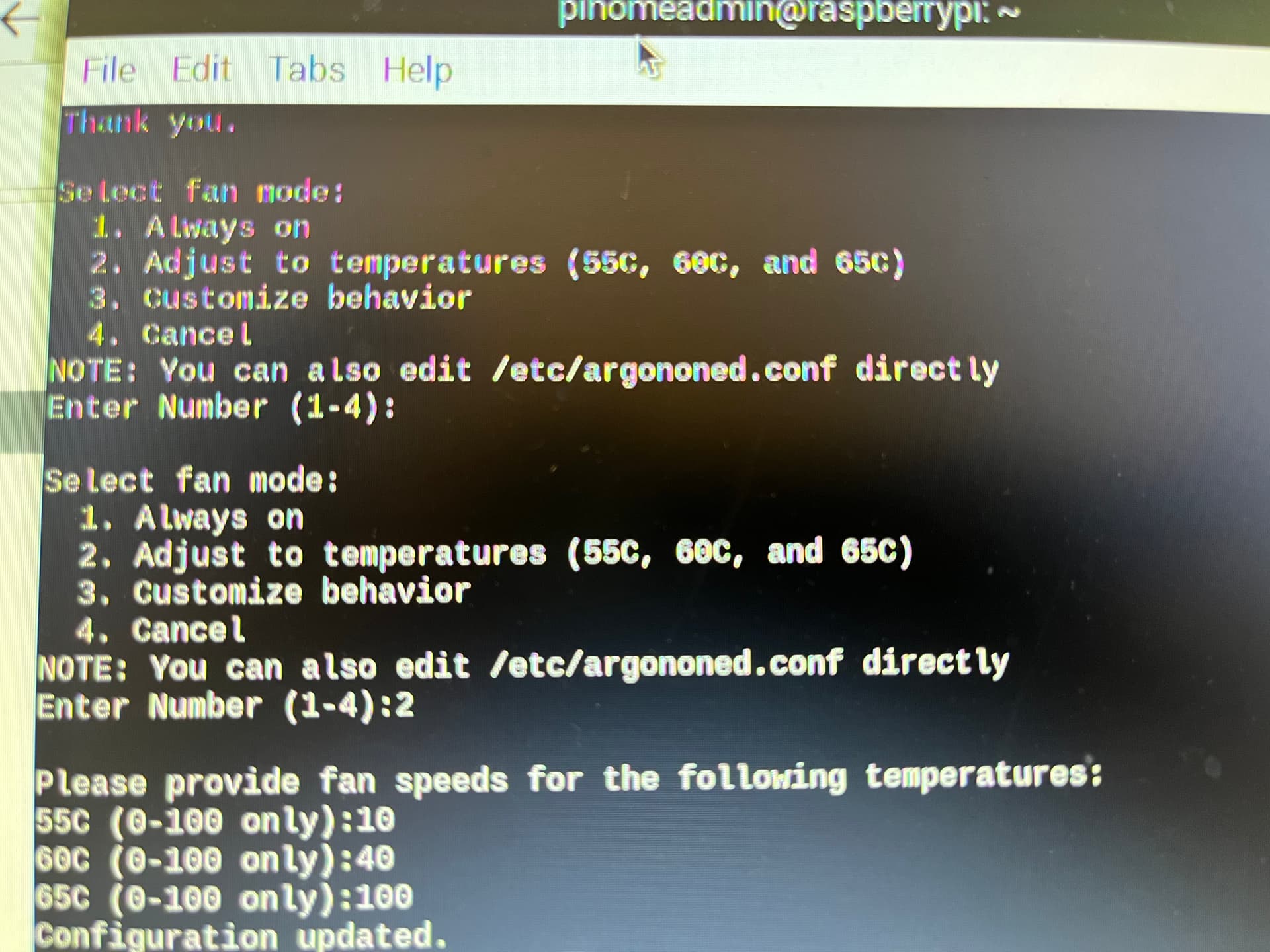
The temp is at 40 deg, so fan should be off, but is spinning on full speed. Also the power button does not work as intended. It does not work at all. So now, I am more of the opinion that there is an issue with the daughterboard.
The GPIO pins for i2c are confirmed working fine as I can talk to the RTC of the Raspbee device.
Let me know your thoughts please.
In addition to the above in that the daughterboard seems faulty, the M.2 adding stopped working today. Pi recognises that USB is plugged in, but no access to data on the disk. Windows also doesn’t recognise the storage medium or the USB connection at all, there is absolutely nothing coming back from the M.2 extension.
Really a bit frustrated with this case and I hope it didn’t kill my SSD.
Hi Ben,
Oh no, looks like that’s almost certainly faulty.
Reply to your order email or send one to the address on our Contact Us Australia page and we’ll take it from there as an RMA.
1 Like
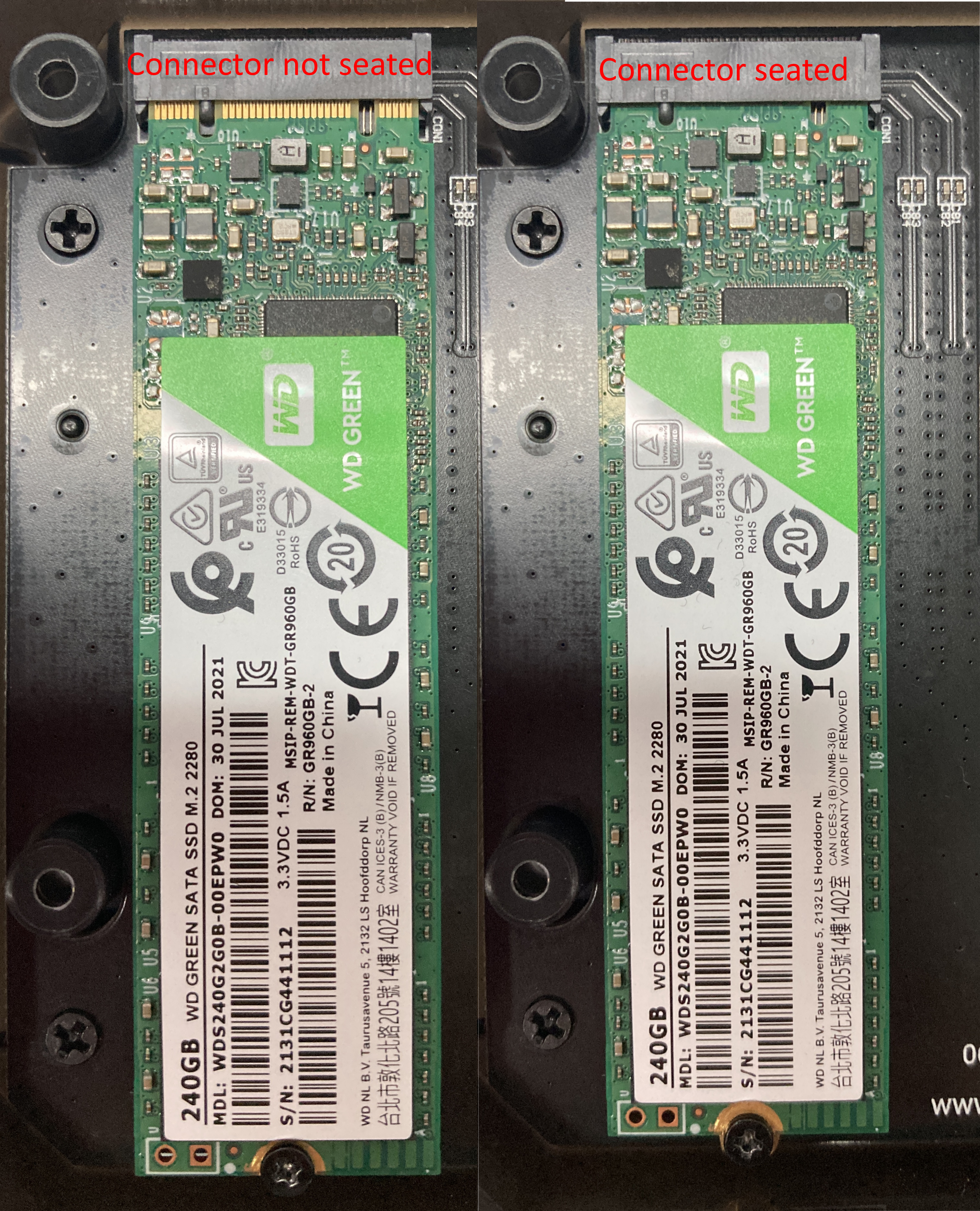
PSA - If you are getting a red and white screen that attempts to boot from USB and then fails in a loop you’ll want to check your SSD connector is seated as shown below.
2 Likes



