@Pixmusix I came across your reply to Joseph saying “I’ve been playing around with audio on embedded systems this year and It can be done! It has been finicky; but it is possible to achieve good results” Can you tell me what you have been doing to achieve good results.
I have tested audio output from pizero2w using WAVESHARE usb to audio, used MAX 98357A to get a clear audio output. But the output from both is not upto the mark, which is a clear audio without any noises, also wifi & BT were turned on, I used a 4 ohm, 3 watt, 3 inch speakers.
For my project I need the wifi and bluetooth to be turned on all the time, as Im fetching audio from a server and will be running some py scripts. The project is more like a Internet Radio.
I was trying to play some music from local downloads, but the quality is not great, there are some noise.
Could help me to sort out the the noise issue.
1 Like
Hi Radio.
Good to have you with us.
Happy to help.
The big takeaway from my journey >>
When I have had noise issues it’s usually been because I haven’t grounded my speaker or my amplifier properly. Worth a look.
To be more specific I’d find a diagram of your setup helpful.
Like, I recognize a lot of those components, but how are they wired and what is the design?
Are you using breakouts like this or your own custom boards?
How are you powering this? Battery, power supply?
I can tell you that I had a good audio experience pulling audio from the usb ports with good ol’ pipewire. Would that work for you, or would you prefer a dedicated i2s amplifier? 
‘.
I’m using a adjustable power supply, I’m using the exact same speaker as shown. My main agenda of this project is to get a clear voice output, which will be streamed from a web app. And my raspi will be connected to wifi.
But for now I’m using a local music file, and SSH to run the music files. Also i tried the same with a I2s max98357a. And still im not able to get a clean audio output, im expecting to get audio quality as good as a smartphone
1 Like
Hi, a lot of that noise usually comes down to power and grounding, especially with Wi-Fi/BT active on the Pi. Make sure the Pi and the MAX98357A are on a clean, stable supply (separate regulator if possible), keep I2S lines short, and add proper decoupling caps close to the amp. Also, try turning off HDMI audio, forcing I2S-only, and using high-quality shielded speaker wiring. Many people get clean results this way, even with Wi-Fi on.
1 Like
Hey.
I’ve never used that Wave-share device, so I’m not sure what quality I can expect.
Let’s assume it has the potential for phone quality audio. I don’t see why it shouldn’t.
I’m surprised that your getting similar noise issues with BOTH i2s devices and the wave-share. That leads me to blame the speaker.
Do you have any way that you could record or monitor the audio coming out of your amp direct? Maybe you could solder up a 3.5mm jack female and use a pair of headphones?
I would be interested in isolating the speaker as the problem (or not).
Hi Radio
Make sure of the grounding connections to the amplifier but if the amplifier is Class D (which I suspect it will be) DO NOT ground the speaker.
I see there is 3 wires to the speaker in that circuit. A Red, a Black and a Blue. The black and blue to the same connections. Is there a reason for this ??
The amp is stereo so you will get only one channel unless you combine the L and R in the RPi as there does not seem anywhere else to do it. Unless there is a switch or link on that Waveshare thing.
DO NOT be tempted to parallel both channels onto the one speaker for ANY reason.
If you do this ground the shield AT ONE END ONLY which would have to be the amplifier end. This MUST be a ground point, NOT the negative side of the speaker which must “float” if a Class D amplifier.
Cheers Bob
Yes i should clarify that grounding a speaker only makes sense when the speaker is active i.e. when my speaker has the amp built in. In you setup don’t ground the passive speaker.
Black n blue are the same, I re drew blue on black as black was not visible.
The way Im ground my modules is, i never did i guess, on the powersupply module there are 3 ports, pos, neg, ground, i have connected pos to pos, neg to neg. and i have connected max/ waveshare pos to raspi pos, neg to raspi ground, but didnt connect raspi ground to powersupply ground.
Let me try connecting them ground.
1 Like
Wait… That doesn’t sound right.
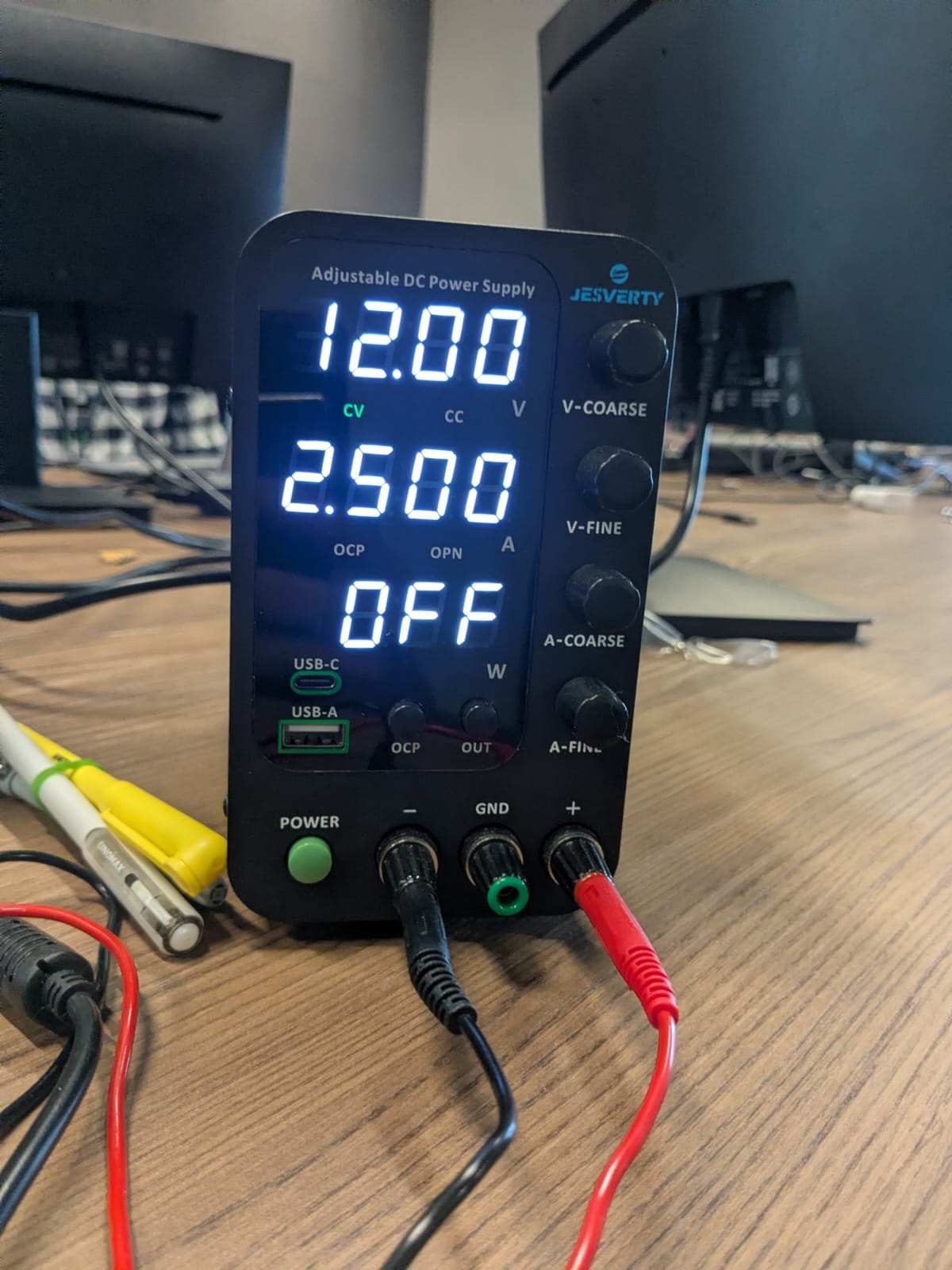
Can you show us your power supply? Is it AC?
1 Like
No im not providing ac, its ac to dc supply
1 Like
Hi Radio
You can ignore the power supply ground if you wish and just regard the negative supply as the overall ground.
That is there in the rare case you need to connect EITHER POSITIVE OR NEGATIVE (But not both of course) to mains ground or sometimes referred to as “Safety” earth
With what you are playing with that is not required as the “Ground” as referred to here is a point that is the same potential for everything. Does not have to be literally “Ground” as in dirt.
I worked on a project some years ago where a whole room (a large one) was “screened” with copper at one site and galvanised steel sheet at another. To save confusion this was called an 'Equipotential Plane" where everything was connected as in “Ground”. This did not have to be actual “Ground” to be very effective.
The term can be very confusing, some cases actually have a “signal” (sometimes called “quiet”) ground and a mains (or safety) ground and with professional audio and video (think TV stations) great care is taken to actually keep the two separate.
Cheers Bob
I see. what about the wires im using for the speakers, im using some non copper thin wires, maybe it could be one of the reasons, let me change them aswell to some copper wire. is there any specific gauge to be used?
I got better results with the MAX98357A I2S setup, running at 32-bit and using an 8Ω 2W speaker specifically. I also tested it using the Waveshare USB-to-audio module, which supports up to 16-bit audio. I think getting a better DAC could further improve the overall sound quality. As for the Wi-Fi and Bluetooth interference I was concerned about earlier, it turned out to have a negligible effect.
1 Like
New folder.zip (3.0 MB)
This contains a glimpse of the audio output I have got, please feel free to check, and let me know if you could suggest a better DAC.
1 Like
Hi Radio
If you were observing this “Noise” on a wide band (100MHz) oscilloscope without actually listening it could have been “noise” you were never going to hear or the speaker could not re-produce anyway
Cheers Bob