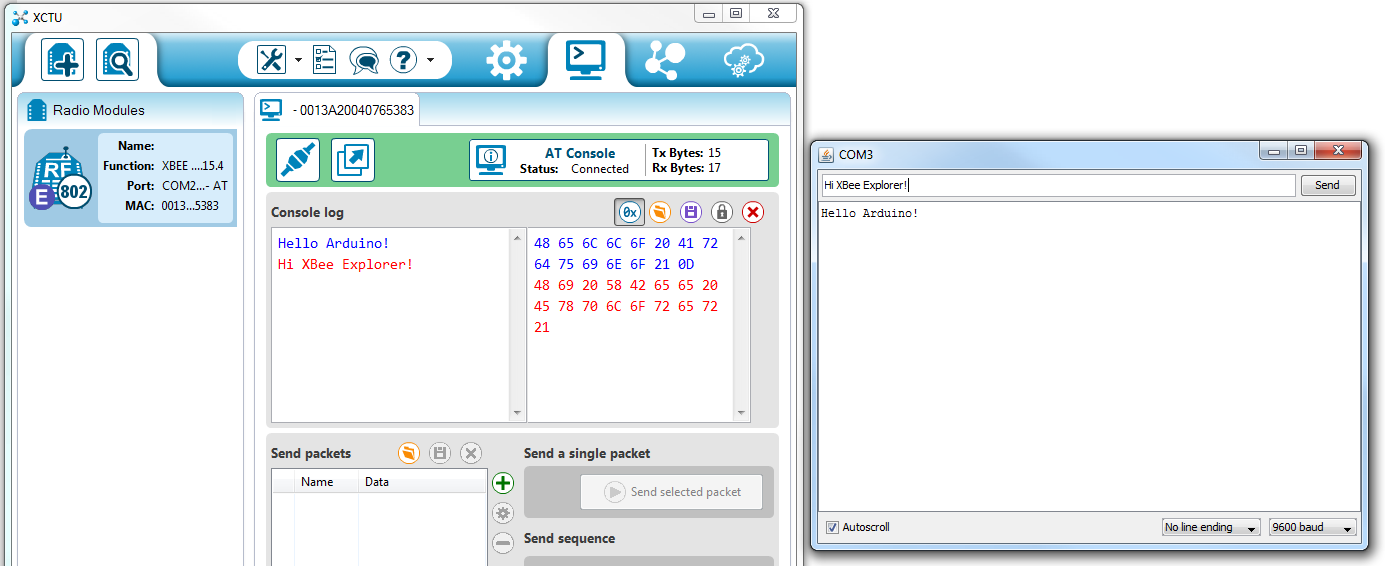
I am trying to learn how to use the XBee Wireless Kit. I can connect two XBee modules to a Windows 10 PC using the XBee Explorer USB, find them in XCTU and get them to send text to each other. However I cannot get the Arduino XBee shield to work. I am following the Sparkfun tutorial at https://learn.sparkfun.com/tutorials/xbee-shield-hookup-guide . I have soldered the stackable headers to the XBee shield and tested the connections with a multimeter - all good. But I cannot get the XBee to send text to the Arduino in the Communication Test.I am using the latest versions of XCTU and the Arduino IDE and am experienced with Arduino. The sketch, from the Sparkfun website, is:
/*****************************************************************
XBee_Serial_Passthrough.ino

Set up a software serial port to pass data between an XBee Shield
and the serial monitor.

Hardware Hookup:
  The XBee Shield makes all of the connections you'll need
  between Arduino and XBee. If you have the shield make
  sure the SWITCH IS IN THE "DLINE" POSITION. That will connect
  the XBee's DOUT and DIN pins to Arduino pins 2 and 3.

*****************************************************************/
// We'll use SoftwareSerial to communicate with the XBee:
#include <SoftwareSerial.h>

//For Atmega328P's
// XBee's DOUT (TX) is connected to pin 2 (Arduino's Software RX)
// XBee's DIN (RX) is connected to pin 3 (Arduino's Software TX)
SoftwareSerial XBee(2, 3); // RX, TX

//For Atmega2560, ATmega32U4, etc.
// XBee's DOUT (TX) is connected to pin 10 (Arduino's Software RX)
// XBee's DIN (RX) is connected to pin 11 (Arduino's Software TX)
//SoftwareSerial XBee(10, 11); // RX, TX

void setup()
{
  // Set up both ports at 9600 baud. This value is most important
  // for the XBee. Make sure the baud rate matches the config
  // setting of your XBee.
  XBee.begin(9600);
  Serial.begin(9600);
}

void loop()
{
  if (Serial.available())
  { // If data comes in from serial monitor, send it out to XBee
    XBee.write(Serial.read());
  }
  if (XBee.available())
  { // If data comes in from XBee, send it out to serial monitor
    Serial.write(XBee.read());
  }
}
I have tried hard to get it to work, but need help.
Hi Richard,
When your XBee is connected via the explorer to XCTU, is it set to 9600 baud? That Sparkfun Tutorial doesn’t really mention it but you have to set up your XBees to talk to each other on XCTU first. Here are the basic steps to getting them started:
"Open X-CTU software
In ‘Modem Configuration’ - Download new versions (get the latest module firmware)
Click ‘Read’
Change the ‘Version’ drop down to the latest version
If my memory serves me correctly, the function set for one of them should be router and one should be end device (doesn’t matter which for simple point to point)
Then change the PAN ID to a value - doesn’t matter what it is as long as the values are the same for both modules.
There are a few other values you can change (power settings etc) but if you need them in the future you will learn what they all do. Basically, if you don’t know what it does, don’t change it!
Then write it to the module, unplug the USB board from the computer, swap the modules, plug the USB board back in and do the same for the second module."
You can also find an explanation here:
http://forum.arduino.cc/index.php?topic=50919.0
and a video here:
Hopefully that gets you started! Let me know how it goes!
Stephen,
Thanks for your reply. But as I said, I am able to get two XBee modules to talk to each other, my problem is getting an XBee module to talk to Arduino via the XBee shield. I have carefully followed the Sparkfun tutorial I mentioned, setting the XBee and Arduino Serial Monitor to 9600 baud. The result is supposed to be as at: https://cdn.sparkfun.com/assets/learn_tutorials/2/3/0/serial_example.png . As I said, I soldered the stackable headers to the XBee shield, and tested the connections with a meter, as I had previously tried it without soldering, and it didn’t work – according to Sparkfun, soldering is necessary. I used a different serial port for the Arduino than I had previously set on the XBee module. But despite all my efforts, I cannot get it to work. Either I am doing something wrong, or the XBee shield I bought from Core Electronics is faulty. My Geekcreit Arduino Uno is probably OK, I have used it with various sketches and never found any problems. The XBee modules must be OK. Can you get it to work?
Richard Watson
Hi Richard,
There are a lot of elements in this setup. It’s highly unlikely that the shield is faulty as its a very simple PCB. Are using the Sparkfun sketch above as is? There is no data being sent in this sketch, it’s just receiving. How are you sending serial data via your other XBee?
There is only one XBee module in this sketch as I understand it, the communication is between the XBee module (entered into the XCTU window) and the Arduino (entered into the Serial Monitor and sent). Can you get it to work?

Hey Richard,
I need some more information to be able to help you out effectively. Could you please send me the code as it is loaded on the Arduino Board, a screenshot of the XCTU setup screen and where you are sending the messages from?
I also need a photo of the shield setup and solder joints that you have made.
Thanks!
Thanks Richard,
How are you checking your continuity? Are you checking between the stackable header pins and the xbee pins directly?
I’m concerned about the look of some of the solder connections, so please verify that they are good. I see a few instances of insufficient wetting that could be the cause. See this article for a little information on what I mean by that if you aren’t familiar:
What lights do you get on the board?
Try adding something in your code like:
void loop() {

XBee.write("Test transmission");

}
Let’s see if we can isolate the problem using this test.
Here is the recommended order of things to check:
1.) Check that the XBee_Serial_Passthrough.ino file is upload to the Arduino Uno with Atmega328P
2.) Check that the switch is flipped ot the DLINE
3.) Check your connections (i.e. your solder joints)
5.) Check your power.
4.) Ensure that the settings are set to the correct configuration to send data with your XBee.
5.) If you are using an Arduino Mega, make sure to use the pins that are able to do software serial communication https://www.arduino.cc/en/Reference/SoftwareSerial.
6.) If you are using a Arduino Leonardo or any board with an Atmega32U4, make sure that you are using the correct function to send data. Serial.print() just pipes data to the Serial monitor while Serial1.print() sends data through the UART. This is explained on the product page for the Arduino Leonardo https://www.arduino.cc/en/Main/ArduinoBoardLeonardo and in this code => https://learn.sparkfun.com/tutorials/pro-micro–fio-v3-hookup-guide#example-1-blinkies
I have very carefully checked the connections between the stackable header pins and the Arduino, and can find no problems with my solder joints. I’m not sure how to check the connections between the XBee module and the shield, the small male pins on the XBee module all mate with the sockets on the shield, if there is a problem it must be with the PCB shield connections. I can get no communication between the XBee module and the Arduino, an extra statement in the sketch makes no difference. The red PWR light on the shield lights, I have seen a yellow flashing light on D105 on occasions, but it is not working now. Have you ever successfully run the XBee_Serial_Passthrough.ino sketch with an Arduino Uno R3 and XBee module Series 1 with an XBee shield? The XCTU app doesn’t seem very good, it has no online help and after I’ve plugged in the XBee modules after unplugging the Arduino I have to restart it to enable the two XBee modules to communicate again. I’m not sure what to do next.

Richard,
You need to use a male jumper to check for high resistance between each female pin that the XBee connects to, and another jumper in the respective male/female stackable header that you soldered on. Is that how you have checked continuity? This is the most important first step. Beyond that, I can’t really tell what configuration that your XBees have.
Here is the full documentation for XCTU. I suggest that you start reading though it and see if there is anything that can help you establish your connection:
Good luck! Hopefully this will help you sort it out.
Stephen,
Thank you for your help. I’ve got my two XBee modules communicating with the Arduino, but it’s very tricky. I did have to resolder one header pin, after which the D105 yellow light flashed continuously. Sometimes you have to restart XCTU and/or power off/on the devices, but at least it works most of the time. I attach screen dump of successful communication.
Glad you got it working Richard!