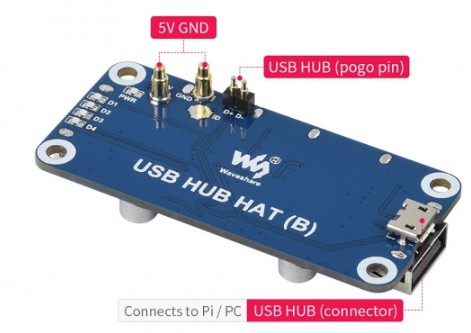
Query about the WaveShare WS20892 USB Hub box for Pi Zero

This is a query about the WaveShare WS20892 USB Hub box for Pi Zero, which I am having some issues with.

Prior history, is for an earlier project to construct a number of devices to monitor power supplies and equipment at remote sites. The original design comprises Pi4B and Pi Zero WH devices running Bookworm, and fitted with the appropriate PiJuice HATs and the NUT package. Worked fine for 4 years or more until some damage was caused by lightning strikes on a couple of sites. As the PiJuice devices are no longer available I had to look into alternative designs, including the use of discrete RTC devices (previously included on the PiJuice devices).

I have adopted the Zero 2W as the main SoC, running 64 Bit Trixie. The UPS devices I have selected are the DFR0528 for the Zeros 2Ws and the DFRobot DFR0494 for the two Pi 4 instances. I have built the prototypes of this design and am working through developing a NUT driver to allow the local DFR UPS’s to be monitored by NUT, as well as using the available NUT drivers for the existing external discrete UPS devices. That’s all good so far :slight_smile:

As part of the Pi Zero 2W devices, I was hoping to add 2 or 3 USB ports, using the Wave Share WS 20892 USB Hub Box device. I recently received all the needed components for the protoypes from you guys and am working on the design and code.

I am having some difficulty getting the WS 20892 HAT to work as expected when attached to the underside on the Pi Zero 2W.,using the Pogo pin configuration.

The issues are:

(i) Hub indicator doesn’t seem to be the full brightness, and

(ii) Connected USB device (flash drives (for testing) and connected USB comm’s from UPS’s are not recognised (don’t light up the USB port indicator or appear in the Pi File Manager.

I have tried:

(a) using a USB cable from a PC to the USB Hub Box (removed from the Pi Zero) - it seems to work there.

(b) Using a 4port USB hub connected to the Pi Zero centre micro USB connector as was used with the previous design - seems to work as expected.

So, I am thinking that perhaps the power the from the DFR 0528 UPS which powers the Pi Zero 2W OK - with battery and USB power (5V) connected to the HAT.

I have just ordered a couple of RPi micro USB 5.1V supplies to connect to the UPS, to see if it is as simple as that or if the UPS is not providing the correct voltage/current to the Zero 2W and the USB Hat?

I am reluctant to try connecting a USB cable from the Zero USB connector to the USB Hat in addition to the Pogo pin setup - I have had issues with that sort of thing before. Also, the enclosure for the USB Hat blocks access to the required microUSB port anyway.

Have I misunderstood something in the instructions for connecting the USB Hat to the Pi Zero 2W/DFR0528 and Adafruit PCF8523? Is there anything you can suggest I should test or try?

1 Like

Hey there, @Stevo52, and welcome to the forum, glad to have you here.

That’s definitely an odd one. Would you be able to do the following so that we can lend a hand with the troubleshooting:

  • Post some pictures of your setup.
  • Would you be able to tell me the outcome of the lsusb command on the Pi Zero?

LSUSB returns:

Bus 001 Device 001: ID 1d6b:0002 Linux Foundation 2.0 root hub (just the USB port on the Zero 2W which is still working but can’t get to it when it’s in the enclosure).

Photo attached of full build - it’s a Zero 2W so not a huge image..

1 Like

Thanks for that, Stevo,

I grabbed one off the shelf to see what could be causing the problem. While trying to attach it to the Pi Zero 2W, I realised that the pogo pins on the underside don’t line up with the Zero 2. Double checked the product page and sure enough its only shows it being attached to the Pi Zero and Zero W:

Because the Pi Zero 2 has a different arrangement of touch pads, there’s no way to get it working with the Zero W:

Well, that a bit of a problem then. Do you have a different style of USB that will work on the Zero 2W? Otherwise I might have to consider a bespoke wired solution to this issue.. on the USB Hat, there is a pogo pin marked ‘ID’ which seems to be the one that doesn’t have a matching pad on the Zero 2W so I will start there.. :slight_smile:

I have started having a look…

  • first thing I see on the WaveShare product page is an image of USB board that does NOT have a pogo pin at the ID location, but the USB board I have does have one fitted?? But that makes me question if the ID Pogo pin is even part of this issue? So only 5V, Gnd and D+/D- Pogos are used to connect to the Zero 2 W?

  • second thing I see on the schematic of the board is that Pin 4 of USBJ1 (microSD port) is tied to ground with the 0 Ohm R23?

  • third thing, comparing the USB Hat to the Wave Share POE/Ethernet/USB Hat (dual board) for a comparison - Pin4 of USBJ1 is shown as floating - i.e. not grounded? Not sure why it is different between the two HATs or whether it should/shouldn’t be grounded?

  • I don’t need POE at all, and it looks like the USB PCB can be used without the POE PCB, but do I still have to buy the complete HAT to try that out??

I will continue looking for a Zero 2W USB hat.. would the 4 Port USB HUB HAT for Raspberry Pi

SKU: WS-12694 work do you think? Not so keen on the header and microUSB joiner though..

1 Like

The video shown here, seems to be the Pi Zero 2W AND the WaveShare USB hat working together, as I expected them too https://www.youtube.com/watch?v=V5F3trKQaZo

1 Like

Hey Stevo,

I’m terribly sorry, the HAT you have does indeed work with the Pi Zero 2W.

And that’s why I need to take my second coffee of the day or otherwise I make dumb mistakes.

Now that I’ve gone ahead and grabbed the correct HAT, I can say a couple of things about it, most importantly that a red LED will pretty much light up immediately when the HAT is connected to the Pi Zero 2 and power is supplied.

Judging by your setup, the pogo pins are aligned and connecting snugly. You should be getting your board to light up and the USB ports working.

I’m going to go and grab a UPS HAT and see what happens when I add it to the setup. Should post another comment here in about an hour.

Once again, so sorry for the mixup.

Did you see my comment about the USB Hat that I have, has an ‘ID’ Pogo Pin? Is that correct?

1 Like

Hi Stevo,

Yes I did. Hence my mistake before. I had the right product page and the wrong product. When I went out to grab the correct board.

Mine also does not have the pogo ID pin, however, I was able to confirm that it is working when I connect the Pi Zero to the USB Hub Box.

However, upon connecting the DFROBOT UPS HAT and LiPo, I’m having the exact same problem that you are. The Green light on the Zero won’t turn on, but the red LED on the USB Hub briefly flashes before dying off again.

Weirdly, before I had actually connected the Standoffs and the Pi Zero and the UPS HAT were only connected by the headers, it did, briefly turn on all three boards and began to boot. This connection was, however, unstable, and some movement killed it. Assembling all three hats together, leads to the USB-Hub not working.

I think at this point, it’s most likely that the the 5V / 2A that the DFRobot outputs is just not quite enough for the Pi Zero 2W and USB Hub at boot, since this sort of inconsistent behaviour gels really well with the behaviour of an insufficient power supply.

OK.. my USB Hat does have an ID Pogo Pin

The DFRobot powers my Pi Zero 2W fine, with or without the USB Hat.

I have not at time had the UPS HAT fire up as it should - just a partial device indicator.

Voltage between pins 1 and 4 on the Type A USB ports are:

  • 4.91 volts when connected to PC via USB cable
  • 1.73 V (core voltage?)when USB HAT is connected to Zero 2 W (No UPS) - USB supply to Pi Zero 2W 4.91 Volts shows correctly between GPIO Pins 2 and 4 and GPIO Pin 6 (Gnd)
  • adding the UPS and the RTC don’t affect the Zero 2W but nothing will start up the USB Hat.

Something is inhibiting full power getting to the USB HAT but can’t feel anything getting hot. I am guess there is an issue with the UPS HAT - possibly the Pogo Pins or the connection from the Pogo pins to the onboard power regulator?

But from what you have said - the HAT I have is different - mine has an ID Pogo Pin and isn’t working as it should? I don’t believe it is the UPS - that supplies 4.91 volts to the Zero 2W ok, but only 1.73V to the pogo pins when HAT is installed to the Zero 2W. I’m puzzled by this and the close coupled boards make it hard to delve further ..

1 Like

I don’t have enough info yet to convince me it is a powers/ups issue. No matter what supply I use (I have a few, including adjustable bench supplies and even a PiJuice UPS Hat) to the Zero 2W, full 4.91 volts doesn’t get to the USB Hat via the Pogo Pin connections but the Zero 2W runs OK… I still think the HAT is the likely culprit.

Also, one other thing that I noticed was happening after several pull-apart and reassemble sequences - after reassembly the reconnect battery and the power USB. on pushing the UPS button for >2 secs, the Zero powers up and at the same time the indicator on the USB briefly flashes brightly then dims (this coincides with a brief burst of 4.91 volts on the USB port pins that then drops to 1.73 volts - which would indicate an electrical switch/shunt situation??

1 Like

I lodged a ticket with WaveShare directly, because I think there is a problem with this USB Hat I have. I have explained the issue, symptoms and findings from the testing I have done over the last couple of days. I have also asked for clarification of any Raspberry Pi Zero 2W configuration and settings that need to be made to get it to work - I think that is where the issue lies but have no proof - I have also asked about whether or not the ID Pogo Pin should be there and if it is required. I have to move on with this issue and if I have to find new USB, UPS and RTC devices, then I want to get started. At present I am dead in the water…. :frowning:

1 Like

The response from WaveShare was disappointing - they want me to send a video of the problem?? It is more of an assembly/configuration issue and the issue is that the USB Hat doesn’t work when attached to the Pi Zero 2W… geez!!

1 Like

A couple of photos - the first is from the WaveShare product page. the second is of the USB HUB HAT (B) that I received here - it has a Pogo Pin at the ID Location. Should that be there? (It was shipped like that, from the supplier to Core).

1 Like

Hi Jane. A further update…

I dusted off an older Pi Zero W and created a Trixie 32 bit SD-Card for it. Fired that up and it worked fine as a vanilla install. Powered it down.

Fitted the USB Hub Hat to the underside of the Zero W - using nylon posts as that was what I had available. Fired it up again, Zero W was working and the USB Hat was also working! Bright red ‘On’ indication, indication also for individual USB ports and LSUSB showed all ports on the USB Hat with something plugged in to them and flash drive data shows in File Manager.

So the USB Hat is fine with the 32 bit Zero W.

Next step, I will go back to the Zero 2W and attach the USB hat, using nylon posts etc, and I will also go back to out of the box, default ‘config.txt’ and ‘commandline.txt’ files. I’ll let you know what transpires..

1 Like

OK, so this might be the solution. With my Pi Zero 2W I did the following:

(i) fitted nylon spacers under the board to fit the USB Hat to.

(ii) fitted a small piece of tape to the Zero 2 W where the ‘ID’ pogo pin would make contact

(iii) used more nylon spacers to secure the USB Hat and support the assembly from the bottom of the USB HAT Box enclosure.

It’s only been 12 hours but IT WORKS FINE.

You might want to add that to your product notes and instructions!

1 Like

I’m glad you solved it, @Stevo52,

I’ll go ahead and update the description. It’s so strange that nylon spacers are necessary for it to work.

Hi Jane,

I am not sure I have completely resolved the issue.

I am finding the WaveShare USB Hub Hat is susceptible to noise on the USB connections which I am still investigating but is taking some time to resolve (due to lack of workbench time to look into it fully).

But the initial issues of getting the USB Hat to even connect correctly with the Pi Zero 2W was definitely due to some sort on ground loop I think. So, isolating the HAT electrically seemed to be the easiest cure. The ‘ID’ Pogo Pin that is present on the USB HAT that I have, which may be a part of the issue, but I have yet to get a definitive answer from either Core or WaveShare as to whether the ID Pogo Pin should be there or not??

Regards

Steve Williams

1 Like